

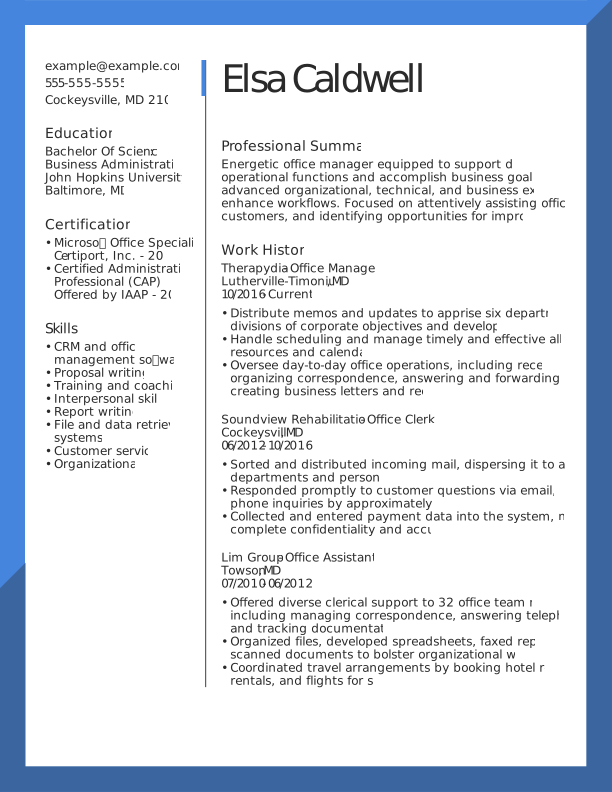

Table of contents
- Fast Facts
- Certifications, Licenses, & Certificates: What’s the Difference?
- Where to Put Certifications on Your Resume
- How to Format Your Certifications (With Examples)
- How to Choose Which Certifications to Include (& Which to Drop)
- How to Find In-Demand Certifications for Your Industry
- Key Takeaways
- Frequently Asked Questions
 Make Resume Now a preferred source on Google
Fast Facts
- Use a dedicated certifications section for multiple relevant credentials or qualifications that are especially important to the job. Otherwise, consider including them under your education.
- Include the full certification name and acronym, such as Project Management Professional (PMP), to help recruiters and screening software recognize your credentials.
- You can list certifications you're actively pursuing. Mark them "In Progress" and include an expected completion date.
- Leave off irrelevant or expired certifications unless they demonstrate qualifications important to the job.
You've earned a professional certification, but where should it go on your resume? Does it belong with your education, alongside your work experience, or in its own section?
Knowing how to list certifications on your resume helps you highlight your qualifications and makes your credentials easier for employers and applicant tracking systems (ATS) to find. This is especially important when you're changing careers, building experience, or applying for a job that requires specific credentials.
This guide explains where certifications belong on a resume, how to format them, and which ones to include.
Ready to highlight your qualifications? ResumeNow's Resume Builder helps you create a professional resume with customizable templates and content suggestions tailored to your experience.
Certifications, Licenses, & Certificates: What's the Difference?
Certifications, licenses, and certificates can all strengthen your resume, but they represent different qualifications. Certifications typically verify professional skills, licenses grant legal permission to perform regulated work, and certificates document completed education or training.
Standard Professional Certifications
Certifications demonstrate that you've met standards established by an industry organization or certifying body. They often require passing an exam, meeting experience requirements, or completing continuing education.
Examples include Project Management Professional (PMP) from the Project Management Institute (PMI) and CompTIA Security+.
If you have multiple relevant certifications, consider listing them in a dedicated "Certifications" section.
Legally Mandated Licenses
Professional licenses authorize you to work in occupations regulated by government agencies or licensing boards. Unlike optional certifications, certain licenses are legally required to perform specific jobs.
Examples include Registered Nurse (RN), Certified Public Accountant (CPA), and Professional Engineer (PE) licenses, depending on state requirements.
If a license is essential for the position, make it immediately visible. You can place the appropriate credential after your name, mention it in your professional summary, and provide full details in a "Licenses & Certifications" section.
Academic & Online Certificates
Certificates generally show that you've completed a course, training program, or educational curriculum. They don't necessarily indicate that you've passed an independent professional certification exam.
Examples include university certificate programs and completion certificates from platforms such as Coursera or LinkedIn Learning.
These certificates can show newly acquired skills, especially if you're entering a different field or have limited professional experience. Include them in your education section or a separate professional development section when appropriate.
Where to Put Certifications on Your Resume
Where you put certifications on your resume depends on how important they are to the job, how many you have, and your experience level.
Make required credentials easy to find, and place supplementary qualifications farther down the page. You can also reference a certification in your work experience section when it directly relates to responsibilities or achievements in a previous role.
Here are four common placement options:
Right Next to Your Name (Header)
If you hold a recognized professional designation, such as PMP or CPA, you can include it after your name when you're authorized to use it. This helps recruiters immediately identify an important qualification.
For example:
Alex Rivera, CPA
Avoid crowding your header with multiple abbreviations or certificates that aren't recognized professional designations.
Inside Your Professional Summary
Your professional summary is another good place to highlight a certification that's especially relevant to the position. Mention the credential alongside your experience and strongest qualifications.
For example:
PMP-certified project manager with seven years of experience leading cross-functional teams, managing budgets, and overseeing project planning and risk management.
A Standalone "Certifications" Section
A dedicated certifications section is usually the best choice when you have two or more relevant credentials or when certifications are especially important for the job.
Place the section above education if your certifications are more relevant to the job than your degree. If the employer requires a particular credential, consider placing the section above work experience so recruiters can spot it immediately.
Use a clear heading, such as "Certifications" or "Licenses & Certifications," and list your most relevant credentials first. When certifications are equally relevant, place the most recently earned one first.
Combined With Your Education Section
If you have only one relevant certification, you can include it in your education section rather than creating a separate section.
This approach also works for recent graduates and career changers who want to highlight their training alongside academic qualifications.
For example:
Education & Certifications
Bachelor of Science in Business Administration
Arizona State University | 2024
Certified Associate in Project Management (CAPM)
Project Management Institute | 2025
How to Format Your Certifications (With Examples)
To list certifications on your resume, include the credential's official name, issuing organization, and relevant dates. Use a consistent format so employers can quickly identify your qualifications and verify them when necessary.
What Details to Include
Use the following details to create a complete, easy-to-read certification entry:
- Certification name and acronym: Write the official name followed by its abbreviation, such as Project Management Professional (PMP).
- Issuing organization: Name the professional association, company, or organization that awarded the credential.
- Date earned and expiration: Include the date you earned the credential and its expiration date, if applicable.
- Credential ID or verification link (optional): Include this information when employers commonly verify credentials online or when the job posting requests it.
- Relevant skills (optional): Add two or three specific skills or tools if they aren't already clear elsewhere on your resume.
Your certifications should complement the skills on your resume, not repeat them. For state-specific professional licenses, include the state or jurisdiction where the license is valid.
ATS Optimization Rules
To make your certifications easier for ATS software to identify, use clear, consistent formatting and relevant terminology from the job description. Avoid design elements that could make credential details harder to read or process.
- Use standard section headings. Choose "Certifications" or "Licenses & Certifications" instead of creative alternatives.
- Include official credential names. Spell out the full name and include the acronym when one is commonly used.
- Match relevant job description terminology. Use the exact credential name requested by the employer when it accurately describes your qualification.
- Keep formatting simple. Use standard text and consistent spacing rather than graphics, icons, or complex tables.
- Avoid keyword stuffing. List each credential clearly instead of repeating its name throughout your resume.
Examples You Can Copy
These examples show how to list completed certifications, highlight relevant skills, and format credentials you're still working toward.
Example 1: Standard Completed Certifications
This format works well when you have multiple relevant certifications and want to keep the section compact:
Certifications
- Project Management Professional (PMP) | Project Management Institute | 2025
- Certified ScrumMaster (CSM) | Scrum Alliance | 2024
- Certified Six Sigma Green Belt (CSSGB) | American Society for Quality (ASQ) | 2023
Example 2: Certifications With Relevant Skills
This approach is useful when the certification supports technical skills that aren't fully demonstrated in your work experience:
Certifications
Project Management Professional (PMP)
Project Management Institute | 2025
Skills: Project planning, risk management, budgeting
Certified Information Systems Security Professional (CISSP)
ISC2 | 2024
Skills: Security operations, risk assessment, access management
Example 3: Certification in Progress
You can list a certification you're actively pursuing, but clearly mark it "In Progress" and include a realistic expected completion date. Once you've earned it, update the entry with the date completed, like so:
Certifications
AWS Certified Solutions Architect – Associate
Amazon Web Services | In Progress
Expected: March 2027
How to Choose Which Certifications to Include (& Which to Drop)
Include certifications that match the job's required or preferred qualifications, prioritizing those most relevant to the position. A focused list of current, relevant credentials is more useful than including every certification you've earned.
Match Your Resume to the Job Description
Start by reviewing the job posting's required and preferred qualifications. Look for certifications, licenses, and technical skills the employer specifically mentions.
- Identify required credentials. Highlight active licenses or certifications the employer explicitly requires.
- Check preferred qualifications. Include relevant certifications that could distinguish you from other qualified applicants.
- Connect credentials to job skills. Prioritize certifications that demonstrate technical knowledge or abilities needed for the role.
- Consider your career goals. If you're changing fields, highlight credentials that support your transition.
Choosing credentials that match the position is one way to improve your resume without adding unnecessary information.
What to Leave Off
Leave off certifications that are expired, outdated, or unrelated to the job unless they demonstrate skills or experience relevant to the position.
- Expired certifications: Don't list expired credentials as active. If an expired credential is relevant, clearly label its status.
- Outdated technical certifications: Remove credentials for software or systems that are no longer relevant to your target role.
- Unrelated certifications: A CPR certificate earned in high school probably won't strengthen a software engineering application unless the job specifically calls for it.
- Basic training certificates: Skip introductory courses when your professional experience already demonstrates more advanced knowledge.
- Overlapping certifications: If several credentials demonstrate similar skills, prioritize the most relevant or advanced ones.
How to Find In-Demand Certifications for Your Industry
To find in-demand certifications, compare job postings for your target role and research credentials through professional associations and certification databases. Focus on qualifications employers frequently request, then consider each certification's cost, eligibility requirements, and career relevance.
Research Tools & Tactics
Use these research methods to identify certifications employers value and verify their requirements before enrolling:
- Review job postings in your field. As a starting point, compare 10 to 15 job postings for roles you're interested in. Look for certifications that appear repeatedly under required or preferred qualifications.
- Check professional associations. Industry organizations can help you identify recognized credentials, eligibility requirements, renewal rules, and continuing education expectations. For example, the Society for Human Resource Management (SHRM) provides details about human resources credentials.
- Use CareerOneStop's Certification Finder. This tool allows you to search credentials by occupation, industry, or keyword.
- Ask recruiters and industry professionals. Recruiters, hiring managers, and industry contacts can help you identify certifications employers require or prefer for your target role.
- Use AI to organize your research. AI tools can help you compare certifications and identify possible skill gaps, but verify their recommendations using official certification providers and current job postings.
Here's an example AI prompt you can use to organize your research:
Compare common certifications for [target job title] in [industry]. Explain their eligibility requirements, typical costs, and relevance to entry-level or experienced candidates. Identify which details need verification.
Top Certifications by Field
Different industries value different credentials, and some positions require specific professional licenses. The table below lists common certifications and professional licenses across five fields. Requirements vary by occupation and employer, so verify which credentials apply to your target role.
| Industry | Common Certifications & Credentials |
|---|---|
| Finance & Accounting | Certified Public Accountant (CPA), Chartered Financial Analyst (CFA), Certified Financial Planner (CFP) |
| Healthcare | Registered Nurse (RN) license, Basic Life Support (BLS), Advanced Cardiovascular Life Support (ACLS), Certified Medical Assistant (CMA) |
| Human Resources | SHRM Certified Professional (SHRM-CP), Professional in Human Resources (PHR) |
| IT & Cybersecurity | CompTIA Security+, Certified Information Systems Security Professional (CISSP), AWS Certified Solutions Architect |
| Project Management | Project Management Professional (PMP), Certified ScrumMaster (CSM), Certified Associate in Project Management (CAPM) |
Key Takeaways
- Review the job description. Identify required and preferred credentials, and prioritize those you hold.
- Check your placement. Make sure important certifications appear where recruiters can spot them quickly.
- Review your formatting. Use consistent spacing, recognizable section headings, and a clear format for every entry.
- Verify your credentials. Double-check certification names, issuing organizations, completion dates, and expiration information.
- Update your credentials. Add newly earned certifications, revise in-progress entries, and remove qualifications that no longer support your application.
Frequently Asked Questions
Should certifications go before or after education on a resume?
Certifications should go before your education section when they're required for the job or more relevant than your degree. For example, a project manager might feature a PMP certification near the top of their resume. If you have just one certification that's less central to the role, you can include it within your education section or immediately afterward. Prioritize the placement that makes your strongest qualifications easiest to find.
How many certifications should you list on a resume?
There's no fixed number of certifications to include on a resume. List those that are relevant to the position, especially credentials the employer requires or prefers. If you have many certifications, prioritize the ones that best demonstrate your qualifications rather than listing everything you've earned. For regulated professions, include all active licenses and certifications necessary for the role.
How do you list certifications in progress on a resume?
List an in-progress certification using its official name, issuing organization, and expected completion date. Clearly indicate that you haven't earned it yet. Only include certifications you're actively pursuing, and update the entry once you've completed the requirements. Don't add the certification's professional designation after your name until you've officially earned the credential.
How do you list multiple certifications on a resume?
To list multiple certifications on a resume, create a dedicated "Certifications" or "Licenses & Certifications" section and list each credential with its official name, issuing organization, and relevant dates. Prioritize certifications that match the job description, placing the most relevant credentials first. Use consistent formatting throughout, and include expiration dates when applicable. If you have several credentials, focus on those that best demonstrate your qualifications for the role.
What information should you include when listing a certification?
Include the certification's official name, issuing organization, and date earned. Add an expiration date if the credential requires renewal. You can also provide a credential ID or verification link when relevant, particularly for technical certifications. Use the full credential name alongside its common acronym, such as Certified Financial Planner (CFP), and keep the formatting consistent with your other entries.


Megan is a career industry editor dedicated to helping job seekers excel in their careers.
More resources

How to List Projects on a Resume (With Examples)
Learn where to list projects on your resume what details to i...

Core Competencies on a Resume: Examples & How to List Them
Show employers what you do best. Learn which core competencies...

How to Show a Promotion on Your Resume (With Examples)
Learn how to show promotions on your resume with clear formatt...

How to Write Skills on a Resume: Step by Step Guide & Examples
Learn how to choose organize and showcase resume skills that...

Resume Bullet Point Examples: How to Write Strong Resume Bullets
Learn how to turn everyday job duties into impressive resume b...

What Is a Resume? Definition, Purpose, & Examples
Learn what a resume is why it matters and how to choose the ...
 Get the job 2x faster*
 Customize your cover letter