


Table of contents
- Fast Facts
- How to Show a Promotion on Your Resume
- How to Show Multiple Promotions at the Same Company
- How to Handle Special Promotion & Job-Change Scenarios
- How to Show Higher-Level Duties Before a Promotion
- How to Tailor Your Resume for an Internal Promotion
- Tips for Making Your Promotion Stand Out
- Frequently Asked Questions
 Make Resume Now a preferred source on Google
Fast Facts
- There are three main ways to show a promotion on your resume: Stack job titles under one employer, create separate entries for each position, or mention the promotion and its date within a single entry.
- Stacking job titles works best for related positions at the same company, especially when each promotion builds on previous responsibilities.
- Separate entries help distinguish major role changes, including promotions involving new departments, leadership responsibilities, or substantially different duties.
- Multiple promotions should demonstrate career progression. List your most recent position first and use achievements to show how your responsibilities and impact increased.
- Clear titles, dates, and accomplishments matter more than a specific format. Choose a layout that makes your employment history easy to follow without exaggerating your advancement.
Getting promoted is an exciting career milestone, but showing a promotion on your resume isn't always straightforward. Should you list each position separately, group your job titles under one company, or simply mention the promotion in your work history?
The best approach depends on how much your responsibilities changed and what you want employers to notice. In this guide, we'll explain three ways to list promotions on your resume, share formatting examples, and show you how to highlight career growth, multiple promotions, and internal job changes.
Need help updating your resume? Resume Now's AI Resume Builder can help you organize your work history, highlight promotions, and create achievement-focused content that reflects your career growth.
How to Show a Promotion on Your Resume
You can show a promotion on your resume by stacking job titles, creating separate entries, or highlighting advancement within a single position. The best method depends on how much your title, responsibilities, and department changed. Whichever approach you choose, make your career progression clear in the work experience section of your resume.
Stack Job Titles Under a Single Employer Heading
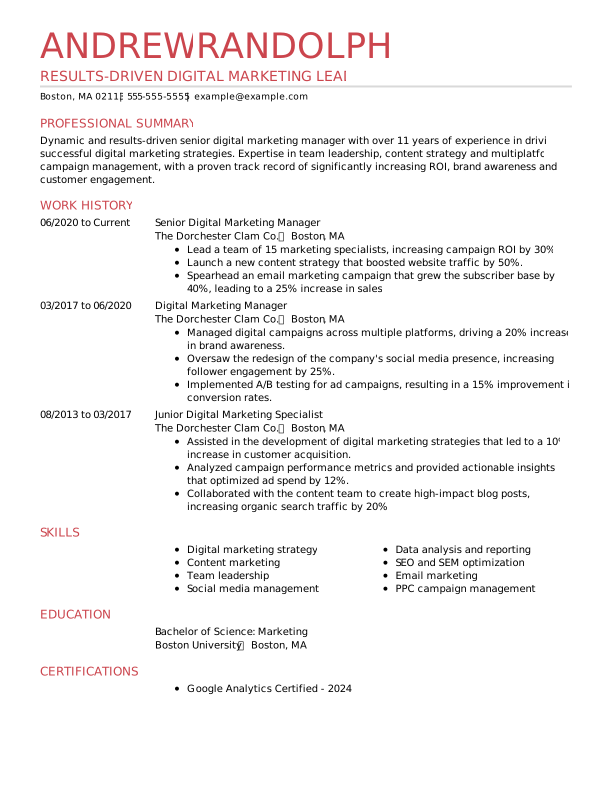
Stacking job titles works best when you've been promoted within the same company, and your new position builds on your previous responsibilities. List the employer once, followed by each title and its employment dates, starting with your most recent role.
Use separate achievement bullets to show how your responsibilities increased with each promotion.
Example of stacked job titles:
Northstar Solutions | Chicago, IL
Project Manager | March 2022–Present
- Lead 12 cross-functional projects with combined annual budgets of $2 million.
- Reduced project turnaround times by 15% through improved scheduling and reporting.
Assistant Project Manager | July 2019–March 2022
- Coordinated project timelines and deliverables across five departments.
- Introduced a tracking system that reduced missed deadlines by 20%.
This format emphasizes continuous employment and advancement without repeating the company name.

Use Separate Entries for Different Roles
Use separate entries when a promotion involves substantially different responsibilities, a new department, or a major change in seniority. This approach gives each position its own space and makes the differences easier to recognize.
Example of separate job entries:
BrightPath Media | Buffalo, NY
Senior Marketing Manager | June 2023–Present
- Lead a team of 12 marketing professionals across digital and traditional campaigns.
- Increased qualified leads by 35% through a revised marketing strategy.
BrightPath Media | Buffalo, NY
Digital Marketing Specialist | January 2020–June 2023
- Managed digital campaign execution with an annual budget of $500,000.
- Improved email conversion rates by 18% through audience segmentation.
Separate entries provide more room for role-specific achievements, but they also take up more space. If you're trying to keep a one-page resume, prioritize accomplishments relevant to your next position.

Highlight Promotion Milestones Within a Single Entry
Highlight a promotion within one work experience entry when your title changed slightly, but your core responsibilities stayed largely the same. This compact approach saves space while still showing professional growth.
Include both your previous and current job titles in the heading, then identify the promotion date in a bullet point.
Example of promotion milestones in one entry:
Digital Harbor Solutions | Austin, TX
Software Engineer I / Software Engineer II | May 2021–Present
- Promoted from Software Engineer I to Software Engineer II in June 2023 after consistently exceeding performance goals.
- Developed software updates that improved application performance by 20%.
- Collaborated with five engineers to reduce system downtime by 15%.
This format makes the promotion visible without creating two nearly identical entries, but it should clearly identify when the title changed. If the roles involved substantially different responsibilities, stacked titles or separate entries may work better.

How to Show Multiple Promotions at the Same Company
To show multiple promotions at the same company, list your positions in reverse-chronological order and highlight how your responsibilities and achievements grew with each role. Three or more positions can demonstrate a strong record of advancement, especially when each reflects greater leadership, ownership, or impact.
Group related positions under one employer heading, giving each title its own dates and relevant accomplishments.
Example of multiple promotions with one company:
Summit Sales Group | Denver, CO
Senior Sales Manager | April 2023–Present
- Lead a team of 20 sales professionals across three regional markets.
- Improve sales strategies, increasing quarterly revenue by 15%.
Sales Manager | January 2020–April 2023
- Supervised 10 sales associates and introduced a new training program.
- Improved team sales performance by 20% over two years.
Sales Associate | August 2017–January 2020
- Ranked among the top 5% of sales associates for three consecutive quarters.
- Exceeded annual sales targets by 30% in 2019.
When listing multiple promotions, follow these guidelines:
- Prioritize recent roles. Give your current or most relevant position more space, especially if it demonstrates leadership or specialized expertise.
- Show increasing responsibility. Highlight changes in team size, budgets, decision-making authority, or project complexity.
- Avoid repetitive achievements. Use distinct accomplishments for each position rather than repeating similar duties.
- Keep titles and dates consistent. Use the same formatting throughout so employers can follow your career progression.
If you've worked for the same employer for many years, you don't need to give every position equal attention. Focus on the roles and achievements most relevant to your next career move.
How to Handle Special Promotion & Job-Change Scenarios
Not every job change within a company is a promotion. Lateral transfers, company mergers, and returning to a former employer can also affect how you present your work history. The key is to show career progression accurately without suggesting that you received a promotion or worked continuously when you didn't.
Lateral Moves & Departmental Transfers
Show lateral moves and departmental transfers as distinct positions when the change in department, job function, or responsibilities is significant. Unlike promotions, lateral moves don't necessarily involve higher seniority or authority.
Focus on the new skills, broader experience, or additional responsibilities you gained.
Example of a lateral transfer:
Northstar Financial Services | Phoenix, AZ
Training Specialist | June 2023–Present
- Develop onboarding materials and train 40 new employees annually.
Customer Service Specialist | March 2020–June 2023
- Resolved customer inquiries and maintained a 95% satisfaction rating.
This example shows a departmental transfer without incorrectly presenting it as a promotion.

Company Mergers & Acquisitions
If your employer changed names after a merger or acquisition, list the current company name followed by the former name in parentheses. This makes your employment history clear when you worked continuously for the same organization under different names.
Example of company merger:
Horizon Technologies (acquired Apex Solutions in 2023) | Dallas, TX
Senior Account Manager | January 2021–Present
- Managed 25 client accounts throughout the 2023 acquisition.
- Maintained a 96% client retention rate during the transition.
This approach establishes employer continuity without implying that the acquisition itself was a promotion.

Leaving & Returning to the Same Employer
If you left a company and later returned, list each employment period separately. This makes the break in employment clear and prevents your resume from suggesting continuous service.
Example of returning to a previous employer:
Greenfield Consulting | Atlanta, GA
Operations Director | February 2024–Present
- Lead a 15-person team and oversee a $3 million operating budget.
Lakeside Partners | Atlanta, GA
Senior Operations Analyst | July 2021–January 2024
- Improved reporting processes, reducing monthly preparation time by 30%.
Greenfield Consulting | Atlanta, GA
Operations Analyst | March 2018–June 2021
- Developed performance reports for five business units.
If you returned at a higher level, let your job titles and accomplishments demonstrate that advancement rather than suggesting you held the position during your absence.

How to Show Higher-Level Duties Before a Promotion
You can highlight higher-level responsibilities on your resume even if you performed them before receiving an official promotion. Focus on the duties you handled, when you handled them, and the results you achieved without changing your formal job title.
This is especially useful if you took on interim leadership, managed a major project, or accepted responsibilities beyond your usual role.
Use these formulas to describe your experience:
- Interim leadership: Served as acting [position] for [time frame], overseeing [responsibilities] and achieving [result].
- Stretch assignment: Took on [higher-level responsibility] while serving as [job title], resulting in [measurable outcome].
- Major project: Led [project or initiative] before promotion, improving [process or metric] by [amount].
Example of high-level duties before a promotion:
Clearwater Logistics | Tampa, FL
Operations Manager | January 2024–Present
- Oversee daily operations for a 12-person team, including workflow planning and performance monitoring.
Operations Coordinator | June 2022–January 2024
- Served as acting operations manager for four months in 2023, overseeing daily workflows for a 12-person team.
- Led a scheduling improvement project that reduced processing delays by 22%.
- Promoted to operations manager in January 2024 after successfully completing the interim leadership assignment.
This example demonstrates accelerated career advancement while keeping the official job titles and dates accurate.
Only connect an achievement to a subsequent promotion when that relationship is factual. If you performed higher-level duties without receiving a promotion, describe the responsibilities and results without suggesting that your title changed.
How to Tailor Your Resume for an Internal Promotion
When applying for an internal promotion, tailor your resume to the higher-level position rather than relying on your employer's familiarity with your work. Highlight accomplishments, leadership experience, and skills that demonstrate you're ready for additional responsibility.
Unlike an external application, an internal resume can draw on your knowledge of company processes, goals, and teams, but your qualifications should still match the new position's requirements.
Use this checklist when preparing your resume:
- Review the internal job posting. Identify the leadership skills, technical qualifications, and responsibilities required.
- Highlight relevant accomplishments. Focus on results that demonstrate your ability to perform at the next level.
- Show leadership and collaboration. Include projects you've led, colleagues you've trained, and cross-functional initiatives you've supported to demonstrate leadership skills.
- Demonstrate organizational impact. Connect your achievements to department goals, operational improvements, or business results.
Use this formula to write targeted achievement bullets:
Action + relevant responsibility + measurable result
Example:
- Led a cross-functional team of eight employees to streamline onboarding, reducing new-hire training time by 25%.

You can also reference strong performance reviews or internal recognition when they're relevant and appropriate to share.
Ultimately, your resume should show that you're qualified for the next position, not simply that you've worked for the company for several years.
Tips for Making Your Promotion Stand Out
Make your promotions easy to identify and support them with accomplishments that show how your career has progressed. These tips can help you present your advancement clearly:
- Use accurate titles and dates. Make each position and its employment period easy to identify.
- Demonstrate increasing responsibility. Highlight changes in leadership, decision-making, project ownership, or the scope of your work.
- Quantify your achievements. Include credible metrics, such as revenue growth, cost savings, team size, or improved efficiency.
- Avoid repetitive bullet points. Focus on accomplishments specific to each position rather than listing the same duties repeatedly.
- Keep formatting consistent. Use readable headings, clear dates, and a layout that remains understandable when converted to plain text.
- Consider applicant tracking systems (ATS). An ATS-friendly resume uses clear headings, consistent dates, and straightforward formatting. Some systems may parse separate job entries more reliably than stacked titles, but compatibility depends on the overall document structure and the system being used.
Choose a resume layout that makes your promotions easy to identify, with consistent job titles, dates, and achievement bullets.
Before submitting your resume, review your work history from an employer's perspective. Your career progression should be clear at a glance, with enough detail to explain what you accomplished at each level.
Frequently Asked Questions
How do I show a promotion when my responsibilities stayed the same?
To show a promotion when your responsibilities stayed the same, you can combine both positions into one resume entry. Include both your previous and current job titles in the entry, and identify the promotion date in a bullet point. Highlight any changes in seniority, recognition, or measurable performance. This keeps your work history concise without hiding your advancement or exaggerating changes in your duties.
Is it better to stack job titles or list them separately?
It's better to stack job titles when your promotions involve related positions at the same company. It saves space and makes your career progression easy to follow. Separate entries work better when your responsibilities, department, or job function changed significantly. Neither method is universally preferred, however, so choose the format that presents your experience most clearly and accurately.
How do I show a promotion without a title change?
To show a promotion without a title change, describe the increased responsibilities, authority, or recognition associated with the advancement in your existing job entry. If your employer formally promoted you without changing your title, you can explicitly mention that milestone. If your responsibilities simply expanded without a formal promotion, describe the new duties and achievements without calling the change a promotion.
Should I mention a promotion in my resume summary?
You can mention a promotion in your resume summary if it demonstrates qualifications relevant to the job you're targeting. For example, you might describe yourself as a marketing professional promoted twice in five years, with experience leading cross-functional teams. You don't, however, need to mention every promotion in your summary. Prioritize your strongest qualifications and leave detailed career progression for the work experience section.
Should I list every promotion on my resume?
No, you don't need to list every promotion on your resume. Prioritize positions that demonstrate relevant skills, increasing responsibility, or significant achievements. Older or less relevant roles can receive fewer bullet points or be summarized when appropriate, but keep employment dates accurate and avoid formatting that misrepresents your career history.


Conor is a Certified Professional Resume Writer (CPRW) and member of the Professional Association of Resume Writers & Career Coaches dedicated to helping job seekers excel in their careers.
More resources

How to Write Skills on a Resume: Step by Step Guide & Examples
Learn how to choose organize and showcase resume skills that...

Resume Bullet Point Examples: How to Write Strong Resume Bullets
Learn how to turn everyday job duties into impressive resume b...

What Is a Resume? Definition, Purpose, & Examples
Learn what a resume is why it matters and how to choose the ...

How to Put Certifications on Your Resume: Where They Go & How to Format Them
Learn how to list certifications on your resume including the...

Resumes for Older Workers (Sample & How to Guide)
Learn how to write a resume as an older worker highlight your...

How to Write an AI Friendly Resume That Impresses Human Recruiters
Learn how to create an AI-friendly resume with clear formattin...
 Get the job 2x faster*
  Customize your cover letter