



Table of contents
 Make Resume Now a preferred source on Google
Fast Facts
- Don't put references on your resume unless the employer specifically asks for them.
- Prepare a separate reference sheet with three to five professional references, depending on your career stage and the employer's instructions.
- Always ask someone's permission before sharing their name and contact information with an employer.
- Choose references who know your work well and can give specific examples of your skills and accomplishments.
- Skip "References available upon request." Employers already know they can ask for references.
References can feel like one more thing to worry about during a job search, but there's good news: In most cases, they don't belong on your resume. Instead, prepare a separate reference list so it's ready if an employer asks for it.
This guide explains how to choose references for a job, how many you need, how to format a professional reference page, and how to ask someone to recommend you.
Should You Put References on Your Resume?
No, you generally shouldn't include references on your resume unless the employer specifically asks for them. Most employers request references separately, often later in the hiring process.
Your resume has limited space, so use it to highlight your experience, accomplishments, and professional skills instead. Keeping references separate also protects your contacts' personal information and leaves more room for job-relevant skills, experience, and keywords that help hiring managers and applicant tracking systems (ATS) understand your qualifications.
Prepare a separate reference sheet to send when an employer requests references, and tailor it to each opportunity when appropriate. You also don't need to write "References available upon request" at the bottom of your resume. That phrase is considered outdated because employers already know they can request references when needed. Instead, use that space for information that strengthens your candidacy.
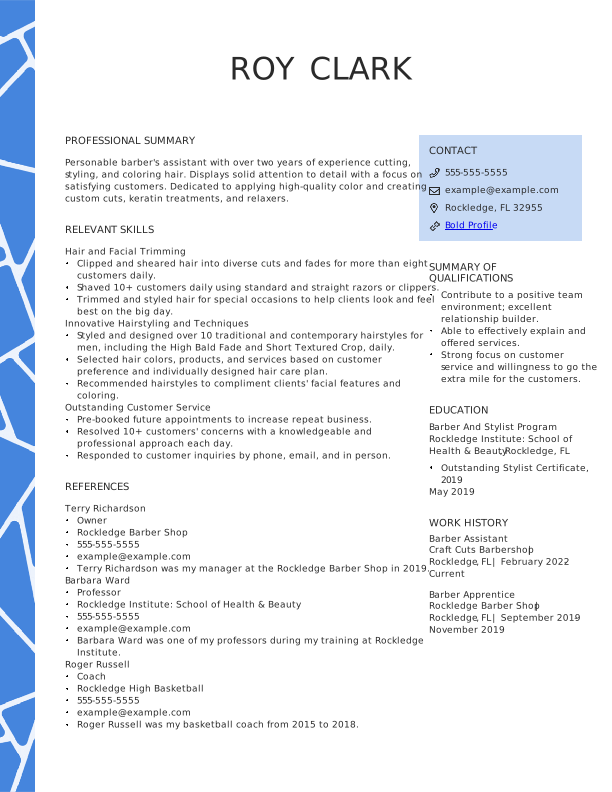
If you're submitting references or other supporting materials, follow the employer's instructions carefully. If a job posting specifically requires references on your resume, add a concise "References" section near the bottom of the document. Otherwise, keep your references on a separate sheet.
How to Build Your Resume Reference List
A strong reference list isn't simply a collection of people who like you. Choose people who know your work well, can describe your strengths with specific examples, and are relevant to the role you're pursuing.
How Many References Do You Need?
Most job seekers need three to five professional references, but always follow the employer's instructions first. A useful starting point is:
- Entry-level: Three references
- Mid-level: Three to four references
- Senior or executive: Four to five references
An employer may request a specific number, so the job posting or recruiter's instructions always take priority.
Who Should You Ask (& Who Should You Avoid)?
When choosing professional references, ask people with whom you've had positive work relationships and who can speak to your skills, experience, and work ethic. This could be a former manager, someone you supervised, a colleague who worked closely with you, or a client or professional collaborator.
| Good References to Include | References to Avoid |
| Former direct managers or supervisors | Family members or spouses |
| Former colleagues who worked closely with you | Friends who can't discuss your work |
| Former direct reports | People who barely know your work |
| Clients or professional collaborators | Anyone you haven't asked first |
| Professors or academic advisers for early-career candidates | Your current boss if your job search is confidential |
| Volunteer supervisors or mentors | Anyone unlikely to give an enthusiastic recommendation |
If you have limited work experience, a professor, adviser, volunteer supervisor, coach, or mentor may be able to speak to your reliability, skills, and character. Personal references can sometimes be appropriate for entry-level candidates with limited professional experience, but professional or academic references are generally stronger.
How to Arrange Your Reference List
Put your strongest and most relevant reference first. That may be your most recent manager, but recency isn't the only factor. A former supervisor who worked closely with you in a similar role may be more valuable than someone you worked with more recently but who knows little about your performance. When two references are equally relevant, list the person you worked with most recently first.
Whenever possible, tailor the order to the job. For example, if you're applying for a management role, lead with someone who can speak directly about your leadership skills.
Pro tip
Written recommendations on LinkedIn can provide additional social proof between formal reference checks. Ask former managers, colleagues, or clients who know your work well to write specific recommendations highlighting your skills or accomplishments.
How to Format Your Reference Sheet
To format professional references, start with a separate, one-page document that visually matches your resume and cover letter. Use the same font, header style, margins, and contact information so your application materials look like one cohesive package.
Give the document a clear heading, such as "Professional References" or "References for [Your Name]."
If you need help creating your resume, Resume Now's AI Resume Builder can help you build a professional resume in minutes. You can also explore our resume examples for inspiration on formatting and presentation.
What to Include for Each Reference
For each reference, include:
- Full name
- Current job title
- Company or organization
- Phone number
- Professional email address
- Your relationship to the reference
- A brief description of your working relationship and the qualifications they can speak to
Add one or two short sentences explaining your professional relationship. This gives the hiring manager immediate context and helps your reference's credentials make sense.
For example:
Margo was my direct manager for three years while I worked as a customer service specialist at Elemental Strategies LLC. She can speak to my client communication, problem-solving skills, and reliability.
Reference Sheet Template & Example
Use this professional references example as a starting point:
[Your Name]
[Phone] | [Email] | [LinkedIn URL]
Professional References
Margo Chan
Director of Customer Experience
Elemental Strategies LLC
555-555-1234
margo.chan@example.com
Margo was my direct manager from 2022 to 2025. She can speak to my work in customer service, team leadership, and process improvement.
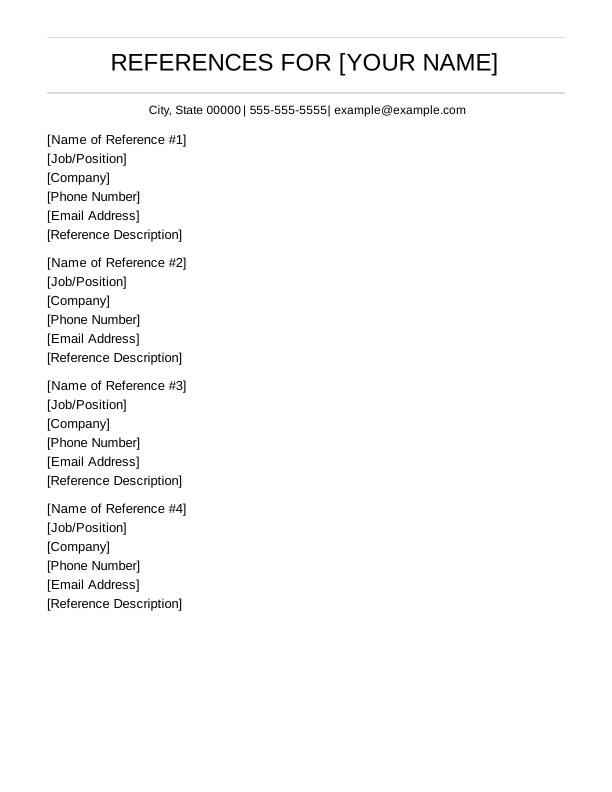
Download our resume reference example sheet above to create your own.
Exception: When a Job Ad Requires References on Your Resume
If the employer explicitly tells you to include references on your resume, follow those instructions. Add a compact "References" section near the bottom of the document after your main resume sections.
Keep each entry concise. Include the reference's name, title, company, phone number, email address, and relationship to you. Don't add references simply because you have extra space.
Place your reference section after essential content, such as your professional summary, work history, education, and skills sections.
Pro tip
Before submitting your application, use Resume Now's free AI Resume Review to check your resume's content, formatting, and customization.
How to Ask Someone for a Reference (Email Template)
Always ask someone's permission before giving an employer their contact information. A quick email works well because it gives the person time to consider the request and lets you provide the details they'll need.
Ready-to-Use Reference Request Email
Subject: Reference Request for [Job Title] Position
Hi [Name],
I hope you're doing well. I'm applying for the [Job Title] position at [Company] and wanted to ask whether you'd be comfortable serving as a professional reference for me.
Because we worked together on [brief context], I thought you could speak to my experience with [relevant skill, project, or responsibility]. I've attached my current resume and the job description for context.
Please don't feel obligated if the timing isn't right. If you're comfortable being a reference, I'll send any additional details before the employer reaches out.
Thank you for considering my request!
Best,
[Your Name]
If an employer asks for a written recommendation rather than a phone or email reference, see our guide to How to Write a Reference Letter.
What to Do After They Say Yes
- Send the job description to help your reference understand what the employer is looking for.
- Share your current resume to refresh their memory about your experience and accomplishments.
- Suggest relevant talking points by mentioning two or three skills or projects that relate directly to the job.
- Confirm their contact information, including their current title, company name, phone number, and preferred email address.
- Give them a heads-up if you know an employer is about to contact them.
- Say thank you after the reference check and update them on the outcome when appropriate.
Frequently Asked Questions
How should references be shown on a resume?
References usually shouldn't be shown on your resume at all. Instead, create a separate professional reference sheet and provide it when the employer asks for references. If a job posting specifically requires references on the resume, add a concise "References" section at the bottom with each person's name, title, company, phone number, email address, and relationship to you.
Who do I put as a reference on my resume?
Choose people who know your work and can give specific, positive examples of your skills and performance. Former managers, supervisors, colleagues, direct reports, clients, professors, and professional mentors can all be strong options. Avoid family members and people who don't know your work well. If you're currently employed, don't use your boss as a reference without considering whether it could reveal your job search.
What is the seven-second rule for resumes?
The seven-second rule refers to the idea that recruiters may initially scan a resume very quickly before deciding whether to keep reading. The exact amount of time varies, so don't treat seven seconds as a universal rule. The practical takeaway is to make your qualifications easy to find by using clear headings, concise content, and relevant accomplishments, rather than filling space with references.
Is it worth putting references on a resume?
Usually, no. References take up space that you can use for relevant skills, accomplishments, and work experience. They also expose another person's contact information before it's needed. Keep a separate reference sheet ready instead, and send it when an employer asks. That way, you can also tailor your reference list to the specific role.


Elizabeth is a Certified Professional Resume Writer (CPRW) and member of the Professional Association of Resume Writers & Career Coaches, dedicated to helping job seekers excel in their careers.
More resources

How to Write a Resume for an Internal Position (Examples, Templates, & Guide)
A resume for an internal position should highlight your curren...

How to Make a Canadian Resume: Format, Examples, & Expert Tips
Learn how to create a Canadian resume with the right format s...

12+ Blank Resume Templates to Download & Fill In
Find a blank resume template that fits your experience and car...
What Should a Resume Look Like in 2026? (Examples)
A professional resume should use a clean easy-to-scan layout ...

What Is an ATS Resume? Definition & How to Write Yours
An ATS resume is a resume formatted to help applicant tracking...
 Get the job 2x faster*
  Customize your cover letter