

Table of contents
- Fast Facts
- How Do AI Resume Scanners & ATS Filters Work?
- The Best Resume Format for AI Screening: Layout, Fonts, & File Types
- How to Optimize Your Resume for AI With Strategic Keyword Placement
- Smart AI Prompting: Refine Your Resume Without Losing Your Human Voice
- How to Test Your Resume for AI Readability
- AI-Friendly Resume Template & Example
- Key Takeaways
- Frequently Asked Questions
 Make Resume Now a preferred source on Google
Fast Facts
- AI-friendly resumes use simple formatting, standard section headings, and selectable text that applicant tracking systems (ATS) and AI screening tools can easily interpret.
- AI resume scanners can use natural language processing (NLP) to evaluate resume content and recognize related skills, terms, and context.
- Single-column resumes are generally easier for parsing software to read than multicolumn resumes with tables, graphics, or text boxes.
- Relevant keywords should be used naturally throughout your resume, especially in your professional summary, skills, and work experience sections.
AI is changing the way people search for jobs—and your resume is part of that shift. Before a recruiter sees your application, an ATS may use AI to scan your resume for relevant skills, experience, and keywords.
You may feel pressure to write for a machine instead of a person, but you don't have to sacrifice your voice to create an AI-friendly resume.
In this guide, you'll learn how to use clear formatting and strategic keyword placement to help AI scanners understand your qualifications while keeping your experience, personality, and professional voice front and center.
Want to leverage AI technology to build your resume? Our resume builder streamlines resume writing with AI-powered content suggestions and polished templates that make a positive, lasting impression on recruiters.
How Do AI Resume Scanners & ATS Filters Work?
AI resume scanners and ATS filters analyze your resume by extracting information and organizing it into categories, such as contact information, skills, work experience, and education. Clear formatting makes ATS processing easier, while complex layouts, graphics, tables, and unusual fonts can make it harder for software to correctly identify key details.
What Is an ATS?
An ATS is software employers use to collect, organize, and manage job applications. Many ATS platforms use resume parsing technology to extract information from your resume and turn it into searchable data. The parser identifies details such as your name, contact information, job titles, employers, dates, skills, and education and organizes them into fields within the system.
Think of an ATS as a digital filing system. Instead of treating your resume as a finished page, it breaks the content into individual pieces that the system can store and search.
For example, a parser may recognize "Software Engineer" as a job title, "Python" as a skill, and "University of Washington" as an education entry. The clearer your resume structure is, the easier it is for the parser to identify and organize these details correctly.
What Is an AI Resume Scanner?
An AI resume scanner uses artificial intelligence, including natural language processing, to analyze resume content and identify relevant skills, experience, and qualifications. Depending on the system, it may evaluate your experience more contextually than a basic parser.
Unlike basic keyword filters that look for exact matches, AI can recognize related terms, synonyms, and context to identify qualifications. For example, if a job description asks for "project management," an AI screening system may recognize relevant experience even if your resume describes you as having "managed cross-functional projects."
AI screening doesn't always happen within an ATS. Some employers use AI screening layers or talent intelligence platforms that operate separately from or alongside a traditional ATS. This helps them analyze candidate information more efficiently, identify relevant skills and experience, and surface candidates who may be a strong match for a role.
Why Resume Formatting Matters for ATS & AI Scans
Whether an ATS parses your resume or an AI screening tool evaluates it, clear formatting helps the technology accurately identify and understand your information.
Resume parsing software primarily works with text and document structure, so visual elements that make sense to a person may not translate cleanly into the data the software extracts.
Some formatting choices can confuse parsing algorithms because they change how text is arranged, hidden, or presented on the page:
- Graphic skill bars: Parsing software may not recognize the graphic as a proficiency rating or may extract the text without understanding what the visual represents.
- Tables: Tables organize information visually, but parsing software may read cells out of order or combine information from different cells. This can cause a job title, employer, date, or skill to be associated with the wrong information.
- Multiple columns: People naturally read a two-column resume from top to bottom within each section. Parsing software may instead read across the page, moving from one column to another and mixing content from different sections.
- Sidebars and text boxes: Information placed in a sidebar or text box may be treated as separate content, skipped, or extracted in the wrong position. The system may struggle to correctly categorize important skills or contact information.
- Icons and graphics: A phone, email, or location icon may look clear to a person, but software may not interpret an image as text. If important information is represented only by an icon or graphic, the parser may miss it.
- Nonstandard fonts: Decorative or unusual fonts can make individual characters harder for parsing software to identify. If the software misreads a character or word, it may not categorize important information correctly.
Pro tip
The goal is to make your resume easy for both technology and people to understand. A clear structure helps AI screening tools accurately process your qualifications while giving recruiters a resume they can quickly scan.
The Best Resume Format for AI Screening: Layout, Fonts, & File Types
The best resume format for AI screening is simple, structured, and easy for software to read. Use a single-column layout, a standard file type, familiar fonts and section headings, and keep your contact information in the main body of the document.
Use a Single-Column Layout
A single-column resume gives parsing software a predictable reading path: top to bottom, one section at a time. Multicolumn templates can disrupt that order because software may read across columns or combine text from separate sections, making it harder to correctly connect job titles, employers, dates, and descriptions.
A single-column layout also makes your resume easier for people to scan. Use clear section breaks and consistent spacing to separate your professional summary, work experience, education, and skills without relying on complex design elements.
Submit a DOCX or PDF File
When possible, follow the employer's instructions for file type. If no format is specified, DOCX is generally a safe choice because its text and structure are easy for many resume parsing systems to process. A text-based PDF can also work well, particularly when you want to preserve your formatting across devices.
Pro tip
Avoid uploading a scanned PDF that contains your resume as an image. Because it may lack a text layer for the software to extract, a parser can interpret the document as blank or miss most of its content. If you use a PDF, make sure you can select and copy the text.
Use Clear Fonts & Section Headers
Choose familiar, readable fonts, such as Arial, Calibri, or Times New Roman. Standard fonts reduce the chance of misread characters during parsing and keep your resume easy to read across systems.
Use conventional section headings, such as "Work Experience," "Education," and "Skills." Creative alternatives may look appealing, but familiar labels make it easier for parsing software to identify what information belongs in each section.
Place Contact Details in the Body of Your Document
Keep your phone number, email address, and location in the main body of the document, preferably near the top of the first page.
Avoid placing essential contact information inside a document header or footer, where some parsing systems may fail to extract it or treat it separately from the rest of your resume.
The goal is straightforward: Make every important detail visible as standard text in a predictable location. A simple structure gives AI screening tools the clearest possible path through your qualifications—and gives recruiters a resume they can understand at a glance.
How to Optimize Your Resume for AI With Strategic Keyword Placement
Optimize your resume for AI screening by using relevant keywords naturally when they accurately describe your experience. Learn how to get your resume past AI by matching important language from the job description, focusing on context rather than repetition. AI screening tools can use surrounding information to better understand your qualifications.
Match the Job Title From the Job Description
When it accurately reflects your role, use the exact job title from the job description in your resume headline, professional summary, or work history section. This connects your background and the position for both screening software and recruiters.
For example, if you're applying for a project manager position and that title accurately reflects your experience, use "Project Manager" on your resume rather than a broader title like "Project Coordinator" or "Operations Professional."
If your previous title differs but your responsibilities closely match, don't change your employment history. Instead, you can use the target title in your headline while keeping your official job title in your work history. Use the target role as a resume headline only when it accurately describes the type of position you're pursuing.
Add Core Terms to Your Professional Summary
Your professional summary should reinforce the most important qualifications from the job description. Choose two or three terms that describe your area of expertise and naturally incorporate them into a short statement.
For example, if a job emphasizes project management, process improvement, and cross-functional leadership, those terms can appear in your summary if they accurately reflect your experience:
Project Manager with 7+ years of experience leading cross-functional teams, improving business processes, and delivering complex projects on schedule and within budget. Skilled in project planning, stakeholder communication, risk management, and process improvement, with a track record of coordinating teams and resources to keep projects moving forward. Experienced in managing competing priorities and translating business goals into clear, actionable project plans.
Add Tools, Skills, & Results to Your Work History
Your work experience section is one of the best places to naturally incorporate keywords because it gives AI screening tools context about how you used a skill, tool, or area of expertise. Instead of simply listing keywords, connect them to an action and a measurable result.
For example, a project manager might structure a work history entry like this:
Project Manager
Microsoft | Redmond, WA | March 2024–Present
- Lead cross-functional teams of 10+ employees to deliver software implementation projects on schedule and within budget.
- Manage project timelines, budgets, and resources using Microsoft Project, reducing project delays by 20%.
- Use Agile project management methods to improve team workflows, shortening average project delivery time by 15%.
- Partner with stakeholders across engineering, sales, and operations to identify risks and resolve project roadblocks.
Notice how the keywords—software implementation, Microsoft Project, Agile project management, stakeholder management, and risk management—are part of actual accomplishments rather than a separate list of terms.
Pro tip
Use specific action verbs to give your keywords more context. Starting each work-history bullet with a clear verb, such as "managed," "analyzed," or "led," tells AI screening tools what you actually did with a particular skill or tool and makes your accomplishments easier for recruiters to understand.
Balance Technical & Soft Skills
Your skills section should include both technical competencies and relevant soft skills, but prioritize the qualifications that appear in the job description. Technical skills, such as software, programming languages, certifications, and industry-specific tools, are often easier for screening systems to identify, while soft skills can help show how you work and collaborate.
For example, a project manager might balance technical skills and soft skills like this:
Skills
- Project management
- Agile methodologies
- Microsoft Project
- Risk management
- Stakeholder communication
- Cross-functional collaboration
- Problem-solving
You can also strengthen soft skill keywords by showing them in context elsewhere on your resume. For example, instead of only listing "cross-functional collaboration" in your skills section, demonstrate it in your work history with a bullet such as:
- Led cross-functional teams across engineering, sales, and operations to deliver software implementation projects on schedule.
Smart AI Prompting: Refine Your Resume Without Losing Your Human Voice
AI tools like ChatGPT can help you identify keywords, strengthen resume bullets, and review your application from a recruiter's perspective.
The best results come when you provide your own experience first and use AI to refine it—not invent accomplishments or write your entire resume from scratch.
Use AI as an Editor
Use AI to refine your resume, not replace your experience. Start by writing your responsibilities, accomplishments, skills, and results in your own words. Then use an AI tool to improve clarity, strengthen wording, or check how well your resume aligns with a specific job description.
AI can turn a vague bullet into a clearer, more results-focused statement, but review every change before using it. Never let AI add skills, responsibilities, metrics, or experience that you don't actually have.
Your resume should reflect your real career history and sound like you—not like a generic AI-generated application. A simple workflow is:
- Write: Describe your experience and accomplishments in your own words.
- Refine: Ask AI to improve clarity, conciseness, or impact without changing the facts.
- Compare: Check the revised version against the job description for relevant skills and terminology.
- Verify: Make sure every claim, number, and qualification is accurate before submitting.
Try These Copyable AI Prompts
AI tools work best when you give them a specific task and clear boundaries. The ChatGPT resume prompts below can help you identify relevant keywords, strengthen your bullet points, and see your resume from a hiring manager's perspective.
Keyword Extraction
Use this prompt to identify the most important ATS keywords in a job description:
Review the job description below and identify the 10 to 15 most important keywords and phrases I should consider using on my resume. Focus on job titles, skills, tools, certifications, qualifications, and industry-specific terms. Rank them by importance. Only include terms that are directly relevant to this position, and don't suggest keywords that my experience may not support.
Job description:
[PASTE JOB DESCRIPTION HERE]
Bullet Point Improvement
Use this prompt when a resume bullet describes what you did but doesn't show the impact:
Rewrite the resume bullet below to make it more specific, concise, and impact-driven. Start with a strong action verb and highlight the result or outcome when the information is available. Naturally incorporate relevant skills or tools from my original bullet.
Don't invent metrics, responsibilities, skills, tools, or accomplishments. If the bullet is missing information that would make the impact clearer, tell me what details I could add instead of making them up.
Original bullet:
[PASTE RESUME BULLET HERE]
Recruiter Role Play
Use this prompt to get a hiring manager's perspective before you submit your application:
Act as a hiring manager reviewing my resume for the position below. Based only on the resume and job description I provide, tell me:
- What stands out as most relevant to this role?
- What qualifications or accomplishments are strongest?
- What important requirements from the job description are missing or difficult to find?
- Which parts of my resume are vague, generic, or unclear?
- What are the top three changes you would make before considering this candidate?
Don't invent experience or assume I have qualifications that aren't shown. Distinguish between a genuine qualification gap and information that may simply need to be clearer.
Job description:
[PASTE JOB DESCRIPTION HERE]
My resume:
[PASTE RESUME HERE]
Protect Your Personal Information
Before pasting your resume into ChatGPT or another AI tool, remove any personal information not needed for the task. You can still get useful feedback without sharing sensitive details, such as your phone number, home address, personal email address, Social Security number, or other identifying information.
For example, replace your contact details with simple placeholders:
- [PHONE NUMBER]
- [EMAIL ADDRESS]
- [CITY, STATE]
Your resume content—such as your work history, skills, education, and accomplishments—is usually what ChatGPT needs for editing or keyword analysis. You can also remove employer-specific information if it's confidential or covered by a nondisclosure agreement.
Pro tip
Before submitting a prompt, take a quick look at everything you've pasted and ask yourself: Does ChatGPT need this information to complete the task? If not, remove it. This simple step lets you use AI for resume help while limiting the personal information you share.
How to Test Your Resume for AI Readability
You can test your resume's readability before submitting it by checking how its text behaves outside the original document. Start with a simple plain-text test to catch formatting and reading-order problems, then use an ATS checker for additional feedback.
The Plain-Text Test
A plain-text test shows you what a resume parser may extract from your document without its visual formatting. It takes less than a minute:
- Open your finished resume and select all of the text.
- Copy and paste it into a basic text editor, such as Notepad on Windows or TextEdit in plain-text mode on Mac.
- Read the text from top to bottom. Check that your name, contact information, section headings, job titles, employers, dates, and bullet points appear in the correct order.
- Look for missing or misplaced information. Pay particular attention to text from columns, tables, sidebars, headers, and footers.
- Check for unusual characters or formatting errors. If words are missing, jumbled, or difficult to read, simplify the original formatting and test it again.
If the plain-text version is confusing or out of order, that's a sign that your resume may also be difficult for some parsing systems to interpret.
Automated ATS Checkers
Automated ATS checkers can add another layer of feedback by comparing your resume with a specific job description or key criteria. Depending on the tool, you may receive a match rate, keyword analysis, formatting warnings, or suggestions for missing skills.
Treat these scores as guidance rather than a guarantee. Different ATS and AI screening systems use different methods, so there's no universal score that guarantees your resume will pass. Use the feedback to identify potential gaps, then make changes to improve your resume.
Pro tip
The best test combines both approaches: Make sure your resume is readable as plain text, then use an ATS Resume Checker to evaluate it against additional criteria that affect AI screening, such as standard section headings, keyword usage, and relevant accomplishments.
AI-Friendly Resume Template & Example
An AI-friendly resume uses clear formatting, standard section headings, and relevant keywords to help ATS and AI screening tools interpret your experience accurately. The template and example below show how to organize your information in a simple, easy-to-read format that works well for both technology and recruiters.
AI-Friendly Resume Template (Copy & Paste)
Use the template below as a starting point for an AI-friendly resume. Keep the structure simple, use standard section headings, and replace the bracketed prompts with your own information.
[FULL NAME]
[City, State] | [Phone Number] | [Email Address] | [LinkedIn URL]
PROFESSIONAL SUMMARY
[Target Job Title] with [X]+ years of experience in [core area of expertise]. Skilled in [relevant skill], [relevant skill], and [relevant skill], with experience [key responsibility or accomplishment]. [Optional: Add a measurable result or area of specialization.]
SKILLS
[Technical Skill] | [Technical Skill] | [Software/Tool] | [Industry Skill] | [Certification] | [Soft Skill] | [Soft Skill]
WORK EXPERIENCE
[JOB TITLE]
[COMPANY NAME] | [CITY, STATE] | [DATES]
- [Action verb] [what you did] using [relevant tool, skill, or method], resulting in [measurable outcome].
- [Action verb] [responsibility or project] to [result or business impact].
- [Action verb] [task or accomplishment], improving [metric, process, revenue, efficiency, quality, or other outcome].
- [Action verb] [relevant responsibility] while collaborating with [team, department, clients, or stakeholders].
[PREVIOUS JOB TITLE]
[COMPANY NAME] | [CITY, STATE] | [DATES]
- [Action verb] [what you did] using [relevant skill or tool] to [result].
- [Action verb] [responsibility or accomplishment] that [measurable outcome].
- [Action verb] [project, process, or task] to support [business goal or team objective].
EDUCATION
[DEGREE OR CREDENTIAL] | [SCHOOL NAME] | [CITY, STATE]
[Graduation Year, if relevant]
CERTIFICATIONS
- [Certification Name] – [Issuing Organization] | [Year]
- [Certification Name] – [Issuing Organization] | [Year]
ADDITIONAL INFORMATION
[Relevant languages, technical tools, professional memberships, or other qualifications.]
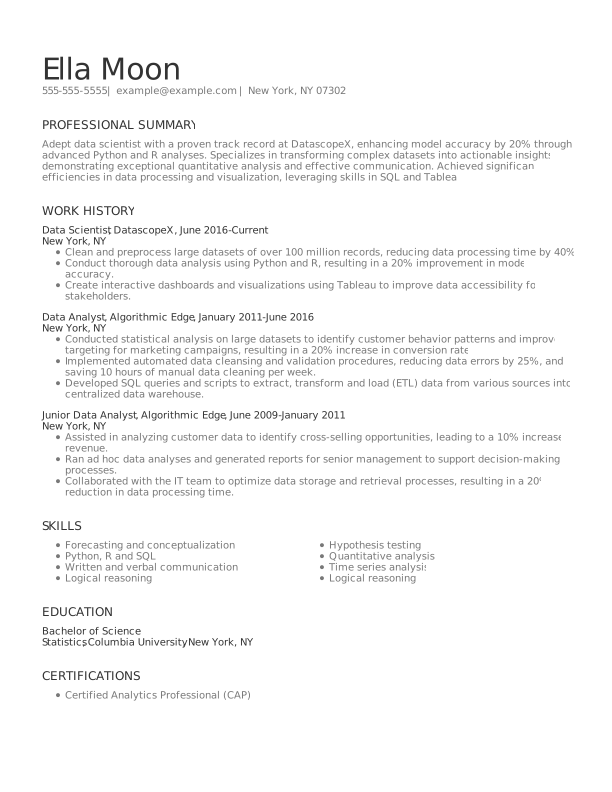
AI-Friendly Resume Example (Customize & Download)
This example shows how the AI-friendly format comes together in a complete resume. Notice the simple single-column structure, standard section headings, relevant keywords, and accomplishment-focused bullet points. Use it as a starting point, then customize the content to reflect your own experience, target role, and qualifications.
Key Takeaways
- Save your resume as a DOCX or text-based PDF unless the employer requests a different file type.
- Use a clean, single-column layout and avoid tables, text boxes, graphics, and other complex design elements.
- Place your contact information in the document body, not in the header or footer.
- Use standard section headings, such as "Professional Summary," "Work Experience," "Skills," and "Education."
- Include full terms and acronyms when relevant, such as Project Management Professional (PMP).
- Write accomplishment-focused bullets that start with strong action verbs and include numbers or measurable results when available.
- Balance hard and soft skills by including relevant technical competencies alongside interpersonal skills that the job requires.
- Check your keywords against the job description and make sure every skill or qualification you include accurately reflects your experience.
- Run the plain-text test by copying your resume into Notepad or another basic text editor and checking that everything appears in the correct order.
- Review your resume for human readability. Read it aloud to catch awkward, generic, or overly polished language and make sure it still sounds like you.
Frequently Asked Questions
Is an AI-friendly resume the same as an ATS-friendly resume?
An AI-friendly resume and an ATS-friendly resume are similar, but they aren't exactly the same. Both use clear formatting, standard headings, and relevant keywords to make your information easier for screening technology to process. An AI-friendly resume also considers how AI-powered tools may interpret context, related terms, skills, and qualifications beyond simple keyword matching.
What resume keywords does AI look for?
AI screening tools look for job titles, technical skills, software, certifications, qualifications, and industry-specific terms that are relevant to the position. They may also recognize related terms and synonyms based on context. Review the job description for the most important requirements, then use relevant keywords naturally throughout your resume.
Can AI read a two-column resume?
Some AI screening tools can read two-column resumes, but results vary by software and how the resume is structured. Multiple columns can cause parsing systems to read text out of order or associate information with the wrong section. For the most reliable results, use a simple single-column layout with standard headings and clearly separated sections.
Is there an AI that can help me with my resume?
Yes, an AI resume builder can help you write, improve, and tailor your resume. Resume Now's AI Resume Builder provides personalized writing suggestions, helps incorporate relevant keywords, and offers ATS-friendly templates to simplify the resume-writing process.
Is it acceptable to use AI for a resume?
Yes, it's acceptable to use AI to help create or improve your resume, as long as the final resume accurately represents your experience and qualifications. Use AI to refine wording, identify relevant keywords, improve clarity, or tailor your resume to a job description. Review every suggestion before submitting your resume, and never allow AI to add skills, accomplishments, or experience you don't actually have.


Elizabeth is a Certified Professional Resume Writer (CPRW) and member of the Professional Association of Resume Writers & Career Coaches, dedicated to helping job seekers excel in their careers.
More resources

How to List Projects on a Resume (With Examples)
Learn where to list projects on your resume what details to i...

Core Competencies on a Resume: Examples & How to List Them
Show employers what you do best. Learn which core competencies...

How to Show a Promotion on Your Resume (With Examples)
Learn how to show promotions on your resume with clear formatt...
How to Write Skills on a Resume: Step by Step Guide & Examples
Learn how to choose organize and showcase resume skills that...

Resume Bullet Point Examples: How to Write Strong Resume Bullets
Learn how to turn everyday job duties into impressive resume b...
What Is a Resume? Definition, Purpose, & Examples
Learn what a resume is why it matters and how to choose the ...
 Get the job 2x faster*
 Customize your cover letter