
 Make Resume Now a preferred source on Google
In the age of information, an online presence has become a key part of the job search and hiring process. Gone are the days of walking into an office building and shaking a manager's hand.
For most roles, your digital resume and virtual professional profiles, especially LinkedIn, are the first impressions that potential employers will remember. But how do you add LinkedIn to your resume in a way that feels natural and professional?
We'll show you how. Here's what we'll cover:
- Why does LinkedIn matter?
- When should you include a LinkedIn URL on your resume?
- How do you list LinkedIn on your resume?
- How do you shorten your LinkedIn URL?
Don't have a resume yet? Our Resume Builder can help you get past the blank page stage by offering professional templates, formatting guidance and customizable generated text that you can use or replace as needed.
Related Guides & Tips
Browse other popular samples
Why Does LinkedIn Matter?
If you're not a big social media user, you might be wondering why some employers expect you to share your social media account on your job application. If you've never used LinkedIn, this might even sound a bit personal or invasive.
But it makes more sense than it may seem. Unlike other social media outlets, professional profiles like LinkedIn and bold.pro share more than just your favorite photos or your wackiest shower thoughts.
Sites like these exist to act as a hub for all of your professional information. You can:
- Upload your resume to LinkedIn.
- Include links to your portfolio on your profile.
- Use professional headshots for your profile picture.
- Connect with colleagues, co-workers and other pros in your industry.
- Post about industry news that excites you.
- Celebrate career milestones.
Why should you include LinkedIn on your resume? Because many employers expect it. In a competitive job market where resumes are often filtered out by applicant tracking systems (ATS) for countless arbitrary reasons, it makes a lot of sense to grasp onto any opportunity you have to make your resume stronger, more ATS-friendly and ensure it meets expectations.
Don't know if your resume is ATS-friendly? Try our ATS Resume Checker to find out today!
When Should You Include a LinkedIn URL on Your Resume?
Now that you know why an employer might want to see your LinkedIn profile, you might think that it should always be present at the top of your resume. That way you'll always have an edge over candidates who don't include it, right?
Not quite. Including a LinkedIn URL is a must when the employer specifically asks for it, and it can be a big help when you have an active LinkedIn presence that you want to draw attention to, but there are times when you're better off omitting it.
Don't include your LinkedIn URL if:
- You haven't built up your LinkedIn. You don't have to be a so-called "LinkedInfluencer," but if your LinkedIn is bare bones and doesn't even feature an up-to-date resume, then you're better off either leaving it off or investing some time to work on it. If the employer asks for it, then you'll need to bulk it up, but if it isn't requested and you don't have a strong profile, then you're better off focusing on building the perfect resume instead.
- You have a more relevant professional profile elsewhere. LinkedIn is the most popular professional networking site, but it isn't the only one. If you use another website more and your profile is more robust, include that link instead. If you belong to any professional organization with a profile related to your field, sharing this more targeted profile could be a bigger advantage. Of course, you can always add multiple links. This is okay up to a point, but don't go overboard!
Deciding what to include on your resume is tough, but as a rule of thumb, you should include your LinkedIn if your profile is up to date and you have no specific reason to leave it out.
Pro tip
A LinkedIn link isn't always a necessary addition to your resume, but many job applications will ask for it whether or not it's listed on the resume itself. If you're serious about embarking on your job search, revisiting your LinkedIn profile is a strategic step you should take to enhance your chances.
How to Put LinkedIn on a Resume
Now you hopefully understand why a LinkedIn URL belongs on a resume and whether or not you need one for the job you're targeting. Next, let's look at how to put a LinkedIn link on your resume.
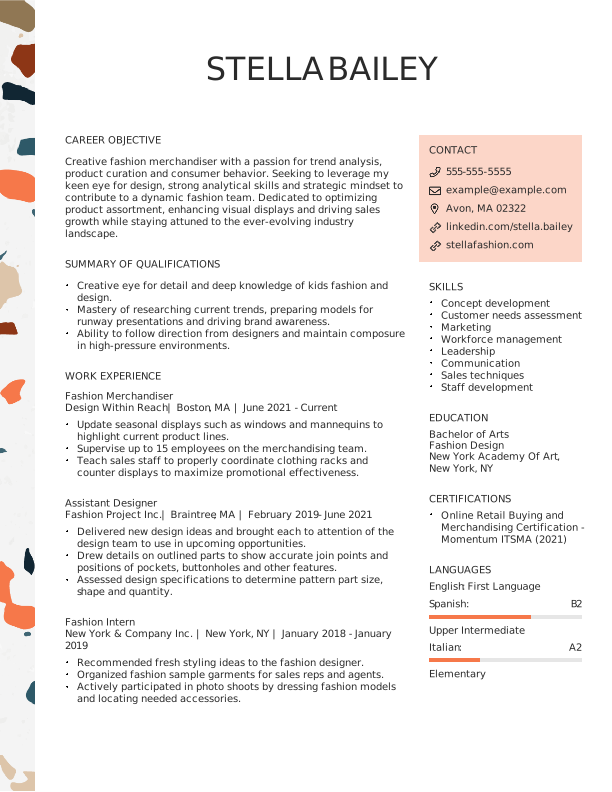
Fortunately, this part is super easy! A LinkedIn URL can go into one of two resume sections. Generally, it belongs at the top of your resume with your contact information. This section is called your resume header and will probably look something like this:
Jennyfer Watkins
That's right, it's that easy! Include your LinkedIn URL by adding it to your contact information in your header.
If you have multiple professional profile links that you've chosen to include, an alternative route is to add a small section for professional profiles. Then, you can just include them in a bulleted list like so:
Professional Profiles
- linkedin.com/example-URL
- bold.pro/example-URL
- certifiedtechnicians.org/example-URL
If LinkedIn is the only profile you're choosing to include, list it with your contact information in your resume's header. This is a better use of valuable resume real estate.
Now that you know how to put LinkedIn on your resume, how about learning how to put your resume on LinkedIn? Your LinkedIn profile allows you to input your past experience in reverse-chronological order, just like a resume, so employers can see your history by clicking your profile. Make your achievements as visible to recruiters as possible to land that interview!
What's more, if you treat your LinkedIn resume like a real one and fill it with relevant skills and keywords, recruiters might just end up contacting you first!
How to Shorten a LinkedIn URL
You might have noticed that your LinkedIn URL has some messy numbers and characters after your name. Nobody wants clutter on their resume!
Improve the professional appearance of your resume's header by shortening your LinkedIn URL. You can do this on a desktop browser by:
- Visiting your profile.
- Clicking the pencil on the "Public profile & URL" in the top right corner of the page.
- Changing the URL to eliminate the clutter!
Change your URL within the LinkedIn app by:
- Visiting your profile.
- Clicking the three dots next to "Add Section."
- Selecting contact information.
- Clicking on the pencil.
- Changing your URL.
And voila! Your LinkedIn URL is complete, without the extra characters!
Key Takeaways
- A LinkedIn profile is an asset
Many employers expect to see LinkedIn profiles during the recruiting and hiring process, but even if they aren't expecting it, your profile gives you important opportunities to network within your field and present your qualifications. You may as well make the most of every tool at your disposal! - You should include a LinkedIn URL on your resume most of the time
You don't always need to include a LinkedIn URL, but it's a good habit. Just make sure that your LinkedIn is up to date and positioned to present you in a good light. Don't include a link to a barren account. - Add your LinkedIn link in your header
Unless you're listing multiple professional profiles and you need a separate section to contain them, your LinkedIn URL should be listed alongside the rest of your contact information in the header of your resume. This makes it easy to see. - Shorten your LinkedIn URL
A longer LinkedIn URL can be a cluttered mess. Make your link look more professional by taking advantage of the fact that LinkedIn allows you to customize it. Shorten your URL for a more polished look.
Resources to help prepare for your interview
- The Most Common Interview Questions and the Best Answers
- 50+ LinkedIn Skills to Make Your Profile Stronger
- How to Follow Up After a Job Interview: Guide & Email Examples
- How to Write a Thank You Email After an Interview
- Behavioral Interview Questions and Answers
- Interview Tips
- How to Prepare for a Job Interview


Hailey is a career writer whose work for Resume Now helped job seekers excel in their careers.
More resources
Resume Bullet Point Examples: How to Write Strong Resume Bullets
Learn how to turn everyday job duties into impressive resume b...
What Is a Resume? Definition, Purpose, & Examples
Learn what a resume is why it matters and how to choose the ...

How to Put Certifications on Your Resume: Where They Go & How to Format Them
Learn how to list certifications on your resume including the...

Resumes for Older Workers (Sample & How to Guide)
Learn how to write a resume as an older worker highlight your...

How to Write an AI Friendly Resume That Impresses Human Recruiters
Learn how to create an AI-friendly resume with clear formattin...

How to Write a Resume for an Internal Position (Examples, Templates, & Guide)
A resume for an internal position should highlight your curren...
 Get the job 2x faster*
  Customize your cover letter