


When it comes to creating a professional resume, even small details like margins can make a big difference.
Resume margins play a crucial role in ensuring your resume is easy to read, visually appealing, and compliant with applicant tracking systems (ATS). Understanding the right margin size can make all the difference when presenting your qualifications in a polished and professional format.
In this article, you'll find:
- What are standard margins on a resume in 2025.
- How to adjust margins for a resume.
- Situations when narrower or wider margins might be more appropriate.
- Examples of standard margins on a resume.
- Practical tips to ensure your resume looks clean and professional.
Save yourself the trouble, and let us make your resume for you. Try our AI Resume Builder to create a perfectly formatted resume in minutes, with customizable margins and generated suggestions tailored to your professional needs.
What Are Standard Margins on a Resume?
The standard margin size for a resume is 1 inch on all sides, providing a clean and professional layout that's easy to read. However, depending on the amount of content you need to include, margins can be adjusted slightly, ranging from 0.5 inches to 1 inch.
It is important to understand that resume margins are the blank spaces that frame the text on your document, creating balance and ensuring a polished appearance. Just like other formatting decisions, such as font and color, choosing your margins can have a great effect on how your document is read.
Why 1-inch margins are the standard
The 1-inch margin is the most widely accepted size for formatting a resume because it creates a visually appealing frame for your text.
This ensures there's enough white space around your content, preventing the page from looking cramped or overwhelming. Additionally, many hiring managers are accustomed to seeing resumes with this layout, making it a safe and professional choice.
Benefits of standard resume margins
Maintaining appropriate margins offers several advantages:
- Professional appearance: Balanced margins give your resume a clean, polished look that reflects attention to detail.
- Ease of reading: Proper spacing improves readability by preventing text from appearing cluttered or difficult to follow.
- ATS compatibility: Applicant tracking systems (ATS) often process resumes more effectively when margins are consistent and text is well-aligned.
The advantages of using well-formatted margins for your resume matter whether you have no experience and are writing a resume for the first time or are a seasoned professional looking to get a senior role. The right resume margins can help highlight your qualifications effectively.
Examples of Standard Resume Margins
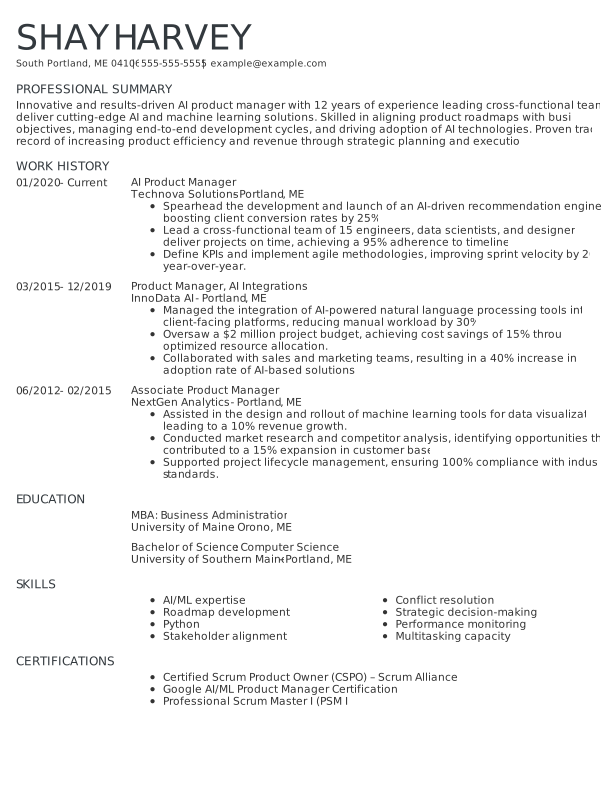
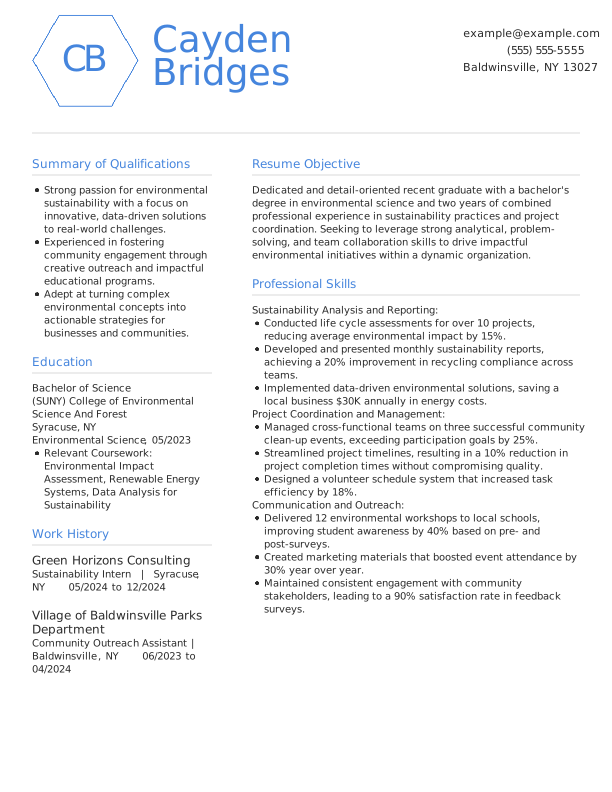
Check out the following resume examples to get a better idea of what the standard margins on a resume are:
0.5-inch margin resume example
1-inch margin resume example
How to Adjust Margins for a Resume
Setting the right margins for your resume is simple. Here's a step-by-step guide to help you get started when writing your resume:
Adjusting margins in Microsoft Word
If you are creating your resume in Word, then you can use the following steps to standardize your margins:
- Open your resume document in Microsoft Word.
- Navigate to the "Layout" tab in the top menu.
- Click on "Margins" in the toolbar.
- Choose "Normal" (1-inch margins) for the standard setting.
- For custom margins, select "Custom Margins …" at the bottom of the dropdown.
- Adjust the top, bottom, left, and right margins to your preferred size (e.g., 0.75 inches).
- Click "OK" to apply the changes.
Pro tip
Check out our high-quality Microsoft Word resume templates to save yourself time when getting started.
Adjusting margins in Google Docs
Similarly, resumes made with Google Doc templates can have their margins changed:
- Open your resume in Google Docs.
- Click "File" in the top-left menu, then select "Page setup."
- In the pop-up window, locate the "Margins" section.
- Enter your desired margin size for top, bottom, left, and right (e.g., 1 inch).
- Click "OK" to save the changes.
Tips for balancing content and white space
Regardless of whether you are using a word processor or an online resume builder, there are some best practices you should consider when formatting your margins:
- Keep it simple: Avoid setting margins smaller than 0.5 inches, as this can make your resume look cluttered and difficult to read.
- Use consistent spacing: Ensure margins are uniform on all sides to maintain a professional appearance.
- Focus on readability: If your resume layout has a lot of content, try reducing font size slightly instead of narrowing margins too much.
Pro tip
Avoid narrowing your margins to squeeze in more text. A cluttered resume can overwhelm hiring managers and make important details harder to spot. Instead, prioritize concise language and proper formatting for a clean, professional look.
When to Use Narrower or Wider Margins
Choosing the right margin size depends on the amount of content in your resume and the impression you want to create with the design.
While 1-inch margins are the standard, there are scenarios where smaller or larger margins might be more effective. Here's how to decide:
When to use narrower margins (0.5–0.75 Inches)
Smaller margins are ideal when you have a lot of information to include in your resume and need more space without spilling onto a second page. Situations where narrower margins work well include:
- Extensive work experience: Professionals with long careers often need to fit multiple roles, achievements, and skills on one page.
- Detailed technical resumes: If your industry requires detailed technical skills or certifications, narrower margins provide extra space for these critical details.
- ATS-optimized resumes: Narrower margins can help ensure that keywords and qualifications are fully included while keeping the resume ATS-friendly.
When to use wider margins (1–1.25 Inches)
Larger margins are better suited for resumes with less content or when you want to create a clean, airy layout. Scenarios where wider margins work best include:
- Entry-level resumes: Recent graduates or job seekers with limited experience can use wider margins to ensure the content fills the page without appearing sparse.
- Creative resumes: Wider margins give creative or design-oriented resumes a minimalist look, highlighting visual elements.
- Short professional summaries: If your career history is straightforward, wider margins help frame the text attractively.
Pro tip
Rather than relying on margin adjustments, prioritize concise, impactful wording that effectively describes your experience. This helps you keep focused on making sure every word on your resume serves the purpose of highlighting your qualifications.
Common Mistakes With Resume Margins
Getting your resume margins wrong can negatively affect its readability and overall presentation. Avoid these common errors to ensure your resume looks professional and polished.
Common resume margin mistakes
- Too small:
- Margins smaller than 0.5 inches can make your resume look overcrowded and hard to read.
- A cramped layout may overwhelm hiring managers and obscure important details.
- Too wide:
- Margins wider than 1.25 inches waste valuable space, making your resume appear sparse or incomplete.
- This is especially problematic if you have relevant job experience or skills that could fill the space.
- Inconsistent margins:
- Uneven margins, such as varying sizes on different sides, make your resume look unprofessional.
- Inconsistent formatting distracts from your qualifications and may give the impression of poor attention to detail.
Pro tip
Always review your resume to ensure margins are consistent and the layout looks balanced. Check your resume on different devices and printers to confirm that the margins display correctly. Small adjustments can have a big impact, so take the time to get it right!
Key Takeaways
- What are standard margins on a resume:
The standard margin size for resumes is 1 inch, providing a balanced and polished appearance. However, adjustments between 0.5 and 1.25 inches can be made depending on your content. - When to use narrow margins:
Use narrower margins (0.5–0.75 inches) for resumes with extensive experience or technical details to maximize space without overwhelming the page. - When to use wider margins:
For entry-level resumes or creative layouts, opt for wider margins (1–1.25 inches) to ensure a clean, airy design that effectively frames the content. - Be consistent:
Avoid common errors, such as inconsistent margins, which can make your resume appear unprofessional or difficult to read.
FAQ
What should margins be on a resume?
The standard margin size for a resume is 1 inch on all sides. This creates a clean, professional appearance that balances white space and text. Adjustments between 0.5 and 1.25 inches are acceptable, depending on your content and layout.
Can I use margins smaller than 1 inch on my resume?
Yes, you can reduce margins to as little as 0.5 inches if you have extensive experience or technical details to include. However, ensure that the content doesn't appear cramped or cluttered, as readability is key.
Are wider margins better for a short resume?
Wider margins (1 to 1.25 inches) can work well for resumes with limited content, such as entry-level resumes or creative layouts. They help fill the page and create a visually appealing design while maintaining professionalism.
Do resume margins affect ATS compatibility?
Consistent and correctly set margins can help your resume pass through ATS systems smoothly. Irregular or inconsistent margins can disrupt text alignment, making it harder for the system to parse your information. If you are concerned your resume may not be compatible, use our online ATS-Resume Checker to find out.
Should I adjust margins differently for each job application?
It's generally unnecessary to change margins for every application. However, if you're customizing your resume significantly and need more or less space, adjusting the margins slightly can help maintain balance and readability.


Conor is a Certified Professional Resume Writer (CPRW) and member of the Professional Association of Resume Writers & Career Coaches dedicated to helping job seekers excel in their careers.
More resources

8 Current Resume Trends for 2026 (With Tips & Examples)
Stay current with 2026 resume trends and learn how to make you...
How to Write a Resume: Guide & Examples for 2026
Learn how to write a resume that gets interviews with our step...

How to Write a Resume With ChatGPT (Step by Step Guide & Prompts)
Learn how to write a resume with ChatGPT using targeted prompt...

Transferable Skills: Examples & How to List Them on Your Resume
Write a resume that stands out by making the most of your tran...

How to Use Resume Now’s AI Resume Builder for Free
Try Resume Now s AI-powered Resume Builder for free to access ...

References Available Upon Request on Your Resume: Is It Necessary?
References available upon request is a phrase added to the bot...
 Get the job 2x faster*
  Customize your cover letter