


Table of contents
- Fast Facts
- What Should a Professional Resume Look Like?
- Standard Resume Blueprint: What to Put Where
- Format Selection: Choose the Right Layout for Your Career Stage
- Common Design Mistakes: What Not to Include in Your Resume
- Real-World Examples of What a Resume Should Look Like
- Key Takeaways
- Frequently Asked Questions
 Make Resume Now a preferred source on Google
Fast Facts
- A professional resume should have a clean, easy-to-scan layout with clearly labeled sections for your contact information, professional summary or objective, work experience, skills, and education.
- Use readable fonts—typically 10–12 points for body text, with larger, bold section headings to create a clear visual hierarchy—and margins between 0.5 and 1 inch.
- For most job seekers, the chronological resume format is the most familiar option and clearly shows career progression by listing the most recent experience first.
- Keep your resume to one or two pages, depending on your experience, and use concise bullet points rather than dense paragraphs.
- Simple formatting, standard headings, relevant keywords, and minimal graphics make your resume easier for both hiring managers and applicant tracking systems (ATS) to process.
Knowing what a resume should look like can feel surprisingly complicated. Should you add color? Is one page still the rule? Do you need a creative design to stand out, or will that make your resume harder for an ATS to read?
In 2026, a strong resume strikes a balance. It should be polished enough to make a professional first impression, yet simple enough for employers and hiring software to quickly find key information. The goal isn't to make your resume the flashiest document in the stack. It's to make your qualifications easy to find, understand, and remember.
Need help with your resume? Try our AI Resume Builder. Just type in your job title and get ready-to-use text for every part of your resume.
What Should a Professional Resume Look Like?
A professional resume should look clean, polished, and easy to scan. In 2026, strong resumes use a simple layout that includes all the standard parts of a resume, organized so that both hiring managers and ATS software can quickly understand your qualifications.
When you write your resume, focus on clear structure, concise language, relevant keywords, and enough white space to make important information easy to find.
Make the Top Third Count
Treat the top third of page one as prime resume real estate. A hiring manager should be able to identify who you are, what you do, and why you're qualified without having to hunt for the information.
Start with your:
- Name and contact information: Include your full name, phone number, professional email address, and city and state. Add a LinkedIn profile or portfolio if it strengthens your application.
- Target job title or professional headline: Use a clear title that reflects the type of role you're pursuing.
- Professional summary: Add a concise, two- to three-sentence overview highlighting your experience, strongest qualifications, and relevant accomplishments.
The rest of your resume should follow with clearly labeled sections for work experience, skills, education, and any optional sections that strengthen your candidacy, such as certifications, projects, languages, or awards.
Choose a Simple, ATS-Friendly Layout
A straightforward single-column layout gives your resume a predictable reading order and can reduce parsing problems with some ATS software.
Avoid relying on floating text boxes, complicated tables, or graphics to communicate essential qualifications. Present important information as standard text within clearly labeled sections.
Optimize White Space for Visual Balance
White space helps separate sections and keeps your resume from feeling crowded. Use margins of about 0.5 to 1 inch, keep spacing consistent, and leave enough room between sections so the page feels organized. Use about 1.15 line spacing for body text, with slightly more space between sections.
If you have to shrink the font or squeeze the margins to make everything fit, cut less relevant content or consider using a second page instead.
Create a Clear Typographic Hierarchy
Use formatting to guide the reader naturally through the page. Keep body text around 10–12 points, then use larger or bold type for your name and section headings.
Keep your font choices and formatting consistent. If you bold one job title, bold every job title. If company names are formatted one way in your first entry, follow the same pattern throughout the rest of your work history.
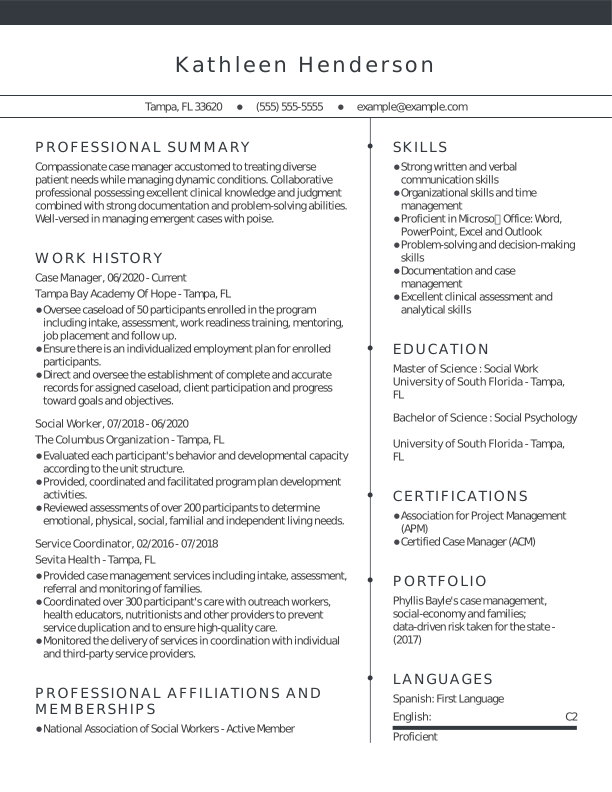
Here's an example of what a resume should look like in 2026:
Standard Resume Blueprint: What to Put Where
Most resumes should follow this order: contact information, summary or objective, work experience, skills, education, and relevant optional sections. Adjust the order when your career stage makes another qualification more important.
Header & Contact Information
Put your name and contact details at the top of the first page. Include your name, city and state, phone number, professional email address, and relevant LinkedIn or portfolio URL. You generally don't need your full street address.
For U.S. applications, leave off personal details, such as your photo, age, date of birth, and marital status. These details aren't necessary to demonstrate your qualifications.
Professional Summary or Objective
Next, add a brief resume profile.
Use a professional summary if you have enough experience to highlight your qualifications and accomplishments. In two to three sentences, identify your professional background, relevant skills, and one or two standout achievements.
A resume objective can make more sense when you're applying for your first job or making a major career pivot. Rather than emphasizing a long work history, focus on how your existing strengths connect to where you want to go next.
Work History That Shows Impact
For each position, clearly list your job title, company information, and employment dates, like so:
Job Title
Company Name | City, State
Month Year–Month Year
In practice, that looks like this:
Marketing Coordinator
MarTech Ventures, Inc. | Chicago, IL
May 2025–Present
Underneath, use concise bullet points to show what you accomplished. Don't simply copy your old job description.
A useful formula is:
[Action] + [What you did/how you did it] + [Result or impact]
For example:
Streamlined monthly reporting processes by introducing standardized templates, cutting preparation time by 25%.
Compare that with "Responsible for monthly reports." Instead of simply listing responsibilities, the first version shows both action and impact.
Pro tip
Strong action verbs make accomplishments more specific and results-focused. Match the verb to the type of impact you want to highlight:
- Leadership: Spearheaded, mentored, scaled
- Efficiency: Streamlined, automated, optimized
- Growth and impact: Generated, expanded, increased
- Problem-solving: Resolved, redesigned, improved
Skills & Education
Place relevant hard skills, tools, technologies, and job-specific terminology in a dedicated skills section and reinforce them naturally in your experience bullets.
Where education belongs depends partly on your career stage. Recent graduates may place education near the top, particularly when their degree, coursework, honors, or academic projects are among their strongest qualifications. Experienced professionals can usually place it after work experience and skills.
Optional Sections
Add sections for certifications, projects, languages, awards, publications, or volunteer experience when they strengthen your candidacy.
Space is limited, so ask yourself: "Does this information help show that I'm qualified for this specific job?" If not, it probably doesn't need a dedicated section.
Format Selection: Choose the Right Layout for Your Career Stage
For most job seekers, a chronological resume is the safest format. Use a combination format when transferable skills need more emphasis, and use a functional format cautiously.
Chronological Resume: The Standard Choice
The chronological resume format is the most widely used and recognized format. It lists your work experience in reverse-chronological order, starting with your most recent job and working backward.
This format is best for candidates with a steady work history and clear career progression in the same field. It shows growth, consistency, and increasing responsibility, which employers value.
Its straightforward structure is familiar to recruiters and can make the information easier for some ATS software to parse.
Combination Resume: The Flexible Option
The combination resume format blends elements of both chronological and functional formats. It begins with a strong skills or qualifications section, followed by a traditional work history.
This format works well for mid-level professionals, career changers, and job seekers who want to highlight transferable skills before showing where they gained them.
For example, an operations manager moving into project management could feature project planning, budgeting, stakeholder communication, and risk management near the top, then provide a conventional reverse-chronological work history showing where those skills were developed.
Functional Resume: Use With Care
The functional resume format focuses on skills and abilities rather than specific job titles or dates. Work history is minimized and often listed briefly at the bottom without detailed descriptions.
A functional resume can emphasize skills over chronology and may work well for people with employment gaps, limited experience, or major career pivots who want to emphasize what they can do rather than where they worked.
That said, it's generally a higher-risk choice because recruiters may have difficulty understanding your work history, and ATS software may parse the structure less predictably.
A safer alternative for many career changers is a combination resume. Lead with transferable skills and relevant accomplishments, then keep a clear reverse-chronological work history below.
Pro tip
If you're unsure which format to choose, a chronological resume is usually the safest option. It's familiar to employers, straightforward for ATS software, and fits the expectations of most industries.
If you're writing a resume with no experience, a chronological or combination format can still work well when you use education, projects, internships, volunteer work, and transferable skills to demonstrate your qualifications.
Common Design Mistakes: What Not to Include in Your Resume
Knowing what a good resume should look like also means knowing which design choices can work against you. Before you format your resume, avoid these common mistakes:
- Skill progress bars and star ratings: "Python 4/5 stars" doesn't explain what you can actually do with Python. Instead, name specific skills and demonstrate your proficiency through accomplishments.
- Profile photos for most U.S. roles: Your appearance isn't a job qualification, and a photo takes up valuable space you could use to showcase your skills and experience.
- Charts, embedded icons, floating text boxes, and complicated tables: These elements may look attractive but can make information harder for some ATS software to interpret. Use straightforward formatting and clearly labeled sections.
- Long paragraphs: Hiring managers should be able to scan your experience quickly. Use concise bullets rather than blocks of job-description text.
- Lists of responsibilities without results: Strengthen your work experience section with accomplishments and strong action verbs that show what you contributed.
- Decorative or hard-to-read typefaces: Stick with professional resume fonts and use consistent font sizes and styles.
- Too many colors: A restrained accent color can add personality, but multiple bright colors may distract from your qualifications.
- Tiny type and narrow margins: Don't sacrifice readability just to force everything onto one page. Your ideal resume length depends on your experience and the information that's relevant to the role.
Pro tip
Not sure whether your formatting is helping or hurting your application? Run your finished document through Resume Now's ATS Resume Checker to identify potential issues before you apply.
Real-World Examples of What a Resume Should Look Like
Formatting guidelines are easier to apply when you can see them in action. Browse our full collection of resume examples for more inspiration, or use the examples below to see how an effective resume can change based on career stage and industry.
Entry-Level Resume Example: Nursing
For a recent nursing graduate, education and clinical training can carry more weight than a long employment history. This example puts high-value qualifications where an employer can spot them quickly, including nursing education, clinical experience, certifications, and patient-care skills.
A clean, simple resume template is particularly well suited to an entry-level nursing resume because it keeps credentials, clinical experience, and practical skills prominent without unnecessary design elements.

Mid-Career Resume Example: Accounting
A mid-career accounting resume should show more than years on the job. This example balances technical accounting expertise with a clear record of career progression and measurable accomplishments.
Notice how the work history remains easy to follow while bullet points emphasize outcomes such as improved processes, reduced costs, audit results, or financial accuracy. A professional resume template helps maintain visual consistency from one section to the next.

Senior or Executive Resume Example: Law
At the senior level, every bullet doesn't need to explain a routine task. Employers care more about scope, leadership, decision-making, and organizational impact.
This legal resume uses space strategically to highlight high-level responsibilities and outcomes, such as major matters handled, teams led, risk managed, or organizational initiatives supported.

Creative Resume Example: Graphic Design
Creative professionals have more room to show personality, but the resume still needs structure. A creative resume template can incorporate distinctive typography, color, or other visual elements while keeping the candidate's qualifications easy to find.
A prominent portfolio link gives employers a place to evaluate the candidate's creative work, while the resume stays focused on skills, accomplishments, software proficiency, and employment history.

Tech Resume Example: Software Development
For software developers, clarity usually beats decoration. A modern resume template can provide a contemporary look while keeping technical skills, programming languages, work experience, and projects easy to find.
Strong tech resumes also provide context for technical skills. Instead of simply listing JavaScript, Python, or AWS, work history and project bullets can show how the candidate used those tools to improve performance, build products, automate processes, or solve problems.

Key Takeaways
Before sending your resume, give it one final audit:
- Zoom out to about 50%. Does the page look balanced, with distinct sections and enough white space to guide your eye?
- Review your accomplishments. Look for opportunities to add meaningful numbers, such as percentages, dollar amounts, team sizes, volume, or time saved.
- Compare your resume with the job description. Make sure your target role, core skills, and relevant resume keywords accurately reflect what the employer is seeking.
- Proofread carefully. Double-check spelling, grammar, dates, phone numbers, email addresses, and links.
- Check your file format. Follow the employer's instructions if provided. Otherwise, a clean DOCX or text-based PDF is generally a practical choice.
- Test readability. Open the final document on desktop and mobile to make sure no content shifts, disappears, or becomes difficult to read.
- Get another set of eyes on it. Resume Now's AI Resume Review can provide personalized feedback and recommendations before you submit your application.
Frequently Asked Questions
What is the seven-second rule in resumes?
The seven-second rule refers to the idea that recruiters spend only a few seconds on their initial resume scan. Rather than treating seven seconds as a strict cutoff, use it as a reminder to make your qualifications easy to spot. Clear headings, concise bullet points, and your most relevant experience near the top can help recruiters quickly understand your fit.
What are the five P's of a resume?
The five P's of a resume are not universally standardized, but one useful framework is to aim for purposeful, precise, professional, polished, and personalized. In practice, that means targeting a specific role, selecting relevant details, using professional formatting, carefully proofreading, and tailoring your resume to each job.
What should a good resume format look like?
A good resume format should be clean, consistent, and easy to scan. Use clearly labeled sections, readable fonts, 0.5- to 1-inch margins, concise bullet points, and enough white space to separate information. For most job seekers, a reverse-chronological layout is a straightforward choice because it puts recent experience first.
Should I include a photo on my resume?
For most jobs in the United States, you shouldn't include a photo on your resume unless the employer or industry specifically requests one. A photo takes up valuable space and isn't necessary to demonstrate your qualifications. Resume conventions differ by country, so research local expectations when applying internationally.
Should a resume be one page or two pages?
A resume can be one or two pages, depending on your experience. A one-page resume often works well for students, recent graduates, and candidates with shorter work histories. Experienced professionals may benefit from a two-page resume when they have enough relevant experience and accomplishments to justify the extra space.
What does an ATS-friendly resume look like?
An ATS-friendly resume uses a straightforward layout, recognizable section headings, readable fonts, and standard text formatting. It should also incorporate relevant resume keywords naturally. Avoid relying on charts, icons, progress bars, or floating text boxes to communicate information an applicant tracking system needs to read.


Emily is a career writer and visual content creator. She is dedicated to helping job seekers navigate complex job markets with practical, research-backed strategies for career advancement and professional growth.
More resources
What Is a Resume? Definition, Purpose, & Examples
Learn what a resume is why it matters and how to choose the ...

How to Put Certifications on Your Resume: Where They Go & How to Format Them
Learn how to list certifications on your resume including the...

Resumes for Older Workers (Sample & How to Guide)
Learn how to write a resume as an older worker highlight your...

How to Write an AI Friendly Resume That Impresses Human Recruiters
Learn how to create an AI-friendly resume with clear formattin...

How to Write a Resume for an Internal Position (Examples, Templates, & Guide)
A resume for an internal position should highlight your curren...

How to Make a Canadian Resume: Format, Examples, & Expert Tips
Learn how to create a Canadian resume with the right format s...
 Get the job 2x faster*
  Customize your cover letter