

Table of contents
 Make Resume Now a preferred source on Google
Looking for ways you can make your resume better?
Check out our list of resume tips to learn what you can do to grab the attention of recruiters, hiring managers, and applicant tracking systems (ATS).
We'll cover:
- General tips for writing your resume
- Resume formatting tips
- Tips for various resume sections
- Tips for building your resume
- Guidance for finalizing your resume
Ready to start building your resume? Resume Now's AI Resume Builder provides organized templates, guidance, and AI-assisted content so you can create a unique resume in minutes.
General Resume-Writing Tips
Tip #1
Limit Your Resume to 1–2 Pages for Most Industries
Don't overburden your resume with unnecessary details.
Instead, be concise. Most hiring managers spend only a few seconds on an initial resume scan, which isn't much time to catch their attention.
For most industries, a one- to two-page resume length is ideal. By keeping it short, you prioritize the most relevant information and present a clean, easy-to-read document.
Pro tip
Some industries use longer documents called a curriculum vitae or "CV." If you work in certain professional fields like higher education, write a CV, which can be longer than two pages, as it encapsulates your entire career.
Tip #2
Customize Your Resume for Each Job Application
No two jobs are exactly alike, even if they share a title. That's why you should tailor your resume for each position you apply for.
The specifics of the job are important. Read the job description carefully to see what's required and tweak your resume accordingly. Doing so will show the employer that you've researched the role and are aligned with their values.
Tip #3
Include Keywords From the Job Description to Bypass Applicant Tracking Systems (ATS)
Many companies use applicant tracking systems to filter out resumes before they even reach a human reviewer.
These systems scan for keywords from the job description to weed out unqualified applicants. If you include the keywords in your resume, you'll have a better shot at moving forward.
Tip #4
Keep Tone Active & Consistent
Use action verbs in your resume whenever possible to give it an active feel. Use them in the present tense for ongoing duties and roles, and in the past tense for past roles.
Also, aim for a consistent tone, be it formal or slightly casual, which will vary based on your industry.
Tip #5
Quantify Your Achievements Wherever Possible
Numbers speak louder than words when it comes to showing impact. A recent Resume Now study found that only 10% of resumes include measurable results. Demonstrating impact on your resume is one of the easiest ways to make sure your resume stands out.
Instead of saying you "increased sales," wow potential employers with something more specific like "boosted sales by 20% in Q1."
Tip #6
Don't Use Passive Voice
Instead of writing "A marketing strategy was developed," use "Developed a marketing strategy." This phrasing emphasizes your actions and their direct impact.
Tip #7
Avoid Clichés
Hiring managers dislike generic phrases like "hard-working" or "team player." While well-intentioned, you'd be better off focusing on showcasing specific examples of how you've demonstrated these qualities through your accomplishments.
Tip #8
Highlight Your Transferable Skills
Transferable skills show how your past experience can apply to your next role—even if your title or industry is changing.
Problem-solving, leadership, and communication, for example, are valuable in nearly every industry. Highlight skills like these, emphasizing how they can benefit the position you're targeting.
Resume Formatting Tips
Step #1
Choose a Readable Font
In some ways, presentation matters as much as content. After all, if the hiring manager can't read your resume, what's the point? A poorly chosen font can hinder your resume's chances of success with both ATS and human readers.
To create a polished and legible resume, give one of these classic professional fonts a try:
- Arial
- Helvetica
- Verdana
Avoid fonts that are difficult to decipher or polarizing, like:
- Comic Sans
- Papyrus
- Brush Script
Tip #2
Mind Your Margins
This one is simple: Your margins should be between 0.5 to 1 inch.
Margins frame your resume and give it structure. Proper margin size offers a balance between maximizing space and making sure your resume doesn't appear cramped.
Tip #3
Use a Tool Made for Resume Building
Formatting is a hassle and outsourcing this work will save you a lot of time.
Millions of job seekers have used AI resume builders to do exactly that. The benefits of a builder include:
- Professional designs
- Built-in, customizable formatting
- Personalized content suggestions
- Download in major file formats
While most builders charge a few dollars to enroll, there are free options—something to consider if you find yourself stumped by formatting.
Tip #4
Use Bullet Points to Improve Readability
Long paragraphs are a major resume no-no.
It's better to use bullet points to break up the copy. When hiring managers are short on time, bullet points will guide the reader's eye and ensure key details aren't missed.
Tip #5
Prioritize the Most Important Information
First impressions count. Again, when time is scarce, and your resume is one of hundreds, hiring managers might only give your resume a fleeting glance.
You'll be in the strongest position if you put your most important points near the top. Make sure to feature a professional summary that's succinct and tailored for the job.
Tip #6
Avoid Clutter
Utilize white space to make your resume look clean and professional.
A cluttered resume can overwhelm recruiters, making it difficult to discern key information. White space acts as a visual breather, separating sections and making your resume appear organized (even when you might not feel that way).
Tip #7
Use Bold & Italics Sparingly
Bold and italics are wonderful when they're used thoughtfully.
Use them occasionally to emphasize certain details you want the hiring manager to notice. For example, bold your section headings, job titles, or previous company names. Consider italicizing subheadings like the "Technical Skills" portion of your "Skills" section.
Pro tip
Consistency is key. If you bold one job title, you must bold them all. If you italicize one of the subheadings in your "Skills" section, you should italicize them all.
Tip #8
Use Color Sparingly
A hint of color can make your resume stand out, but don't overdo it.
Too much color can be distracting or come off as unprofessional. A subtle touch—perhaps for headings or your name—can be effective.
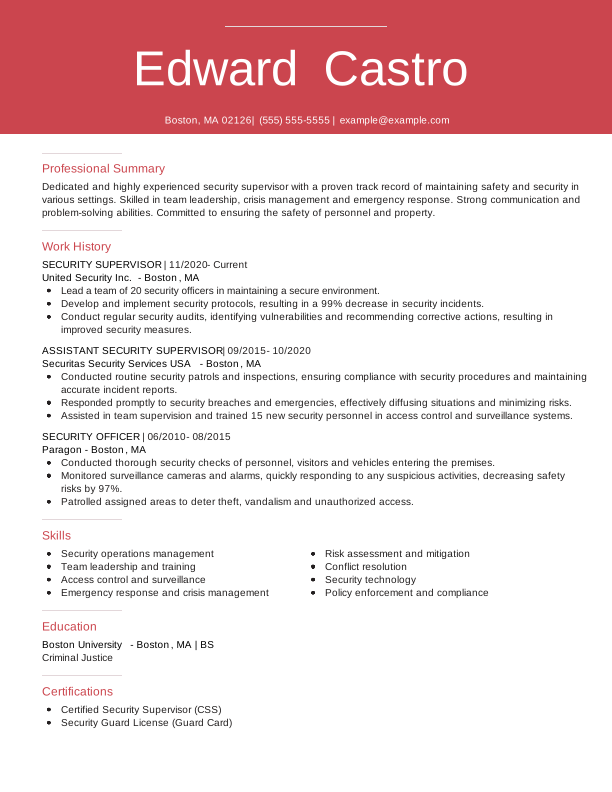
Here's an example of a resume that uses color very well:
Tip #9
Use a Resume Template as a Starting Point
When you're worried about formatting, resume templates offer a shortcut.
Templates give you a predefined structure that adheres to industry standards. They'll keep your information clean, organized, and professional. All you need to do is fill in the details.
They come in various styles—from modern and creative to plain and simple—and format types. Choose the style that best suits your industry and create a resume in the file format the employer prefers.
Tip #10
Consider a Creative Template in Artistic Fields
While simple and modern templates are perfect for many industries, artistic fields often call for something more distinctive.
If your profession is in art, photography, design, or similar creative areas, your resume can serve as a mini-portfolio, showcasing your artistic flair and design skills.
Tip #11
Start With a Resume Profile
Grab attention right away with a resume profile.
This short, powerful summary at the top of your resume showcases your best skills and experiences, making a strong first impression and setting the tone for the rest of your resume.
Tip #12
Clearly Lay Out Your Career Goal
There are two types of resume profiles: objective statements and professional summaries.
A resume objective is perfect for sharing a vision for your career.
Objectives will touch on skills and top experiences, like a professional summary, but they emphasize purpose and direction more. Ambiguity can be misinterpreted as a lack of focus, so always be direct and state your aim.
Here's what a good career objective would look like:
Recent pharmacy graduate with a deep understanding of pharmaceutical principles, drug interactions, and modern dispensing techniques. Eager to apply knowledge and passion for patient care to a clinical pharmacist position at ABC Health. Committed to leveraging skills to ensure accurate medication administration, optimize patient outcomes, and contribute to a collaborative healthcare team.
Tip #13
Align Your Objective or Summary With the Job
While your resume should reflect your career, it should also be customized for the target role.
You can do that by reading the job description—a trusted way of matching an employer's expectations—or reviewing the company's mission. Either one will show that you've done some research.
Tip #14
Show Your Value With Metrics
Demonstrate how you'd contribute to a company's growth and success by citing your previous impact. This means going beyond your qualifications and previous responsibilities.
You can highlight this impact with specific accomplishments and numbers in your professional summary. Here's an example:
Dynamic and results-driven project manager with a proven track record of successfully overseeing 50+ cross-functional projects from inception to completion within the past 5 years. Recognized for consistently delivering projects 15% under budget and ahead of schedule, leading to an estimated cost saving of $2 million. Successfully managed and mentored a diverse team of 20+ professionals, achieving a 95% retention rate. Awarded "Employee of the Year" in 2025 for outstanding performance and dedication to excellence.
Tip #15
Limit Your Summary or Objective to 3–5 Sentences
Brevity is key to creating a resume that recruiters can scan and appreciate in seconds.
Aim to limit your summary or objective to three to five succinct sentences that capture your professional peaks. Think of it as your elevator pitch—it should be compelling and concise, leaving the reader eager to learn more about you.
Tip #16
Changing Industries? Consider a Summary of Qualifications
If your career path is taking a new direction, especially into a different industry, your work history alone might not tell the whole story.
A summary of qualifications lets you spotlight skills and experiences that are transferable and relevant, even if they're from earlier roles or volunteer work. This section can help you make a compelling case for your candidacy by focusing on your most applicable abilities and accomplishments.
Example summary of qualifications for a marketing role:
- Proven track record in project management, successfully leading cross-functional teams in a nonprofit setting.
- Strong communication skills honed through 5 years of experience in public relations and community outreach.
- Advanced proficiency in social media analytics and content creation, consistently boosting online engagement by over 50%.
- Creative problem-solver with expertise in brand development and market research.
Contact Info Tips
Tip #1
Stick to Essentials
Less really is more when it comes to contact info.
Your contact section should only cover the basics, like:
- Your name
- Phone number
- LinkedIn profile
- City and state (or country)
Anything beyond that can clutter your resume and detract from its professionalism.
Pro tip
If you work in a creative field, you should also include a link to your professional portfolio. Sometimes, showing your work is more effective than explaining it.
Tip #2
Omit Most Personal Details
While you might be tempted to share personal tidbits to stand out, it's best to leave them off your resume.
Information such as marital status, age, or religious affiliation doesn't pertain to your professional abilities and might introduce biases, inadvertently or otherwise.
Tip #3
Use a Professional Email Address
Your email address can often be a first impression, so make it count.
Addresses like quiltingqueen@example.com or karatekidfan87@example.com won't do. Whether they're based on inside jokes or personal hobbies, ditch playful or outdated email addresses for something straightforward like your first and last name.
Tip #4
Include a Location
Although remote work has become more popular, location still plays a role in your resume. After all, some remote roles require you to live in a specific state or country or have the ability to commute to the office on occasion.
You don't need to add your entire address; just the city and state (or country) will suffice.
Resume Work Experience Tips
Tip #1
Go With a Chronological Resume to Highlight Work History
Structure matters.
The chronological format is the most common resume format because it focuses on work history, starting with your most recent job and working backward.
Anyone with even a little bit of work history would do well with this format.
There are two other alternatives to consider as well:
- The functional resume format focuses almost exclusively on skills, which makes it well-suited when you're fresh out of school or changing industries and have few relevant work experiences.
- The combination resume format balances skills and experience, making it well-suited for mid-career professionals who want to highlight a particular skill set alongside relevant experience.
Tip #2
Spotlight Relevant Roles
Not all experiences are equal. Depending on the job you're targeting, you may want to highlight specific accomplishments more closely aligned with that job's requirements. That's the best way to show you've flourished in a similar context.
Tip #3
Use Action Verbs for Emphasis
Give your resume the momentum it needs by starting each bullet point with a powerful action verb. Words like "orchestrated," "transformed," or "spearheaded" not only capture attention but also vividly illustrate your contributions in past roles.
Tip #4
Spice Up Your Descriptions
Repetition can quickly make your resume seem monotonous. Ensure you mix up your verbs and descriptions to reflect the breadth of your experiences and skills. This variety will better showcase the full range of your skill set.
Pro tip
Avoid jargon. While industry-specific terms can show expertise, overloading your resume with jargon can make it inaccessible to recruiters or HR personnel who might not be as familiar with specific terminology.
Tip #5
Include Achievements
Achievements put your real-world impact in the spotlight.
Bullet points should highlight examples of times you exceeded targets, introduced beneficial changes, or earned promotions. Quantify these accomplishments with numbers and percentages whenever possible.
Tip #6
Align It With Your LinkedIn Profile
Double-check that your resume and LinkedIn profile mirror each other in terms of roles, dates, and descriptions. This alignment helps build credibility and reinforces your professional narrative when potential employers do a quick online check.
Tips on Including Education
Tip #1
New Grads Should Lead With Education
If you're a recent graduate with limited experience, your education section should feature prominently on your resume.
While experienced professionals might lean on their work history, recent graduates should champion their educational background. Don't be shy! Position your education at the forefront of your resume.
Tip #2
List Your Degrees in Reverse-Chronological Order
When listing your degrees, start with your most recent one and work backward. Over time, once you've climbed the academic ladder with an advanced degree, feel free to drop your high school diploma.
Here's what that might look like for someone who holds a Ph.D. in Psychology:
Ph.D. in Psychology
University of California, Los Angeles
June 2025
Dissertation: "Cognitive Behavioral Therapy: Innovations in Practice"
Master of Science in Psychology
Michigan State University
May 2020
Bachelor of Arts in Psychology
University of Texas at Austin
May 2018
Honors: magna cum laude
Tip #3
Mention Relevant Coursework
The education section of your resume isn't only about college degrees.
You can use this area to touch on coursework—as long as it's relevant.
For example, if you're applying for an SEO role, mentioning that you took a course in digital marketing fundamentals is definitely a plus.
Pro tip
When you're still working toward completing a degree or certification, you'll need to communicate this to potential employers. Listing your education as "In Progress" or "Expected [Month, Year of Completion]" should do the trick.
Tip #4
Mention Current Learning
Your skills should always be evolving.
Are you enrolled in a course? Pursuing a new certification? Highlighting ongoing learning shows your dedication to personal growth and your proactive attitude toward your career.
Tip #5
Include Your GPA—Only if It's Impressive & Recent
Proud of your GPA? Depending on your circumstances, it might be worth highlighting.
But proceed with caution. If your GPA is a shining beacon of academic excellence and is recent, by all means, include it. But if it's been several years since you graduated or if the number isn't particularly stellar, leave it off and let your other accomplishments take center stage.
Tips for Additional Resume Sections
Tip #1
Showcase Relevant Skills
Throughout your resume, and especially in your skills section, you should highlight a mix of skills.
They can be soft skills like communication and problem-solving, or hard skills like data analysis and project management. Both interpersonal and technical skills should be accounted for on your resume.
Tip #2
Flaunt Your Certifications
Certifications are the badges of expertise you've collected throughout your professional journey. If you have certifications, give them a distinct section on your resume. They're a great way to show engagement in your career.
Tip #3
Touch on Conferences & Publications
If you have experience speaking at conferences or have published articles related to your field, add a publications or conferences section to your resume. This is the perfect showcase for expertise and contributions to your field.
Research your target industry to determine the best way to present this information. For publications, include the title, publication date, and co-authors. For conferences, list the event name, date, and the topic of your presentation.
Tip #4
Declare Language Proficiencies
Languages on a resume are highly sought after by employers because they demonstrate strong communication abilities, open you up to new opportunities, and indicate diverse expertise.
Pro tip
Be transparent about your level of mastery. Being clear with potential employers will avoid awkward conversations in the future, whether it's basic, conversational, or fluent.
Tip #5
(Relevant) Volunteer Work Matters
Volunteer work on your resume can indicate both your career values and real-world experience—especially if experience is something you lack.
If you have space on your resume and the volunteer work is particularly relevant to the job, create a dedicated section for volunteering.
Tip #6
Mention Noteworthy Projects
Many professionals and students work on projects outside their regular jobs. These are worthwhile additions to your resume if they meaningfully relate to your career.
Pro tip
Another solid addition to your resume is honors and awards. Be specific by mentioning the award's name, the organization that granted it, and the date received. If the name is not self-explanatory, include a bullet about its significance.
Tip #7
Include Internships or Training
Many job seekers have an internship, training, or apprenticeship under their belt.
In some cases, you may want to break the internships into their own section, but in most cases, they can take a seat in your work history. After 5 to 10 years have passed and you're deep into your career, you should focus on your professional history and omit your internships.
Tip #8
Tread Carefully With Hobbies
While hobbies can add a personal touch to your resume, it's important to limit hobbies on your resume to the most relevant ones.
If a hobby directly aligns with the job or showcases transferable skills (like leadership in team sports), it's worth including. You don't need to tell the employer about your model train set or your passion for karaoke, but you can discuss personal projects that relate to your career skills.
Tip #9
Highlight Conferences & Workshops
Conferences, seminars, and workshops are more than just learning opportunities.
They're also platforms where professionals network, share, and stay up to date on the latest in their field, making them a reasonable addition to your resume. Highlight conference participation, presentations, or similar activities within an optional resume section.
Tip #10
Omit "References Available Upon Request"
As modern resume practices evolved, the phrase "References Available Upon Request" became redundant. Most employers assume you'll provide references if asked.
Save that precious space on your resume for more compelling content that showcases your qualifications and achievements.
Pro tip
Although mentioning your references on your resume is considered obsolete, you should nonetheless have a professional references list ready to go should anyone ask for it.
Resume Building Tips
Tip #1
Use a Resume Builder
Choose a resume builder that offers ATS-friendly templates, customization options, and industry-specific content. Look for builders with positive user reviews and a variety of export formats.
Tip #2
Utilize Built-In Suggestions
Resume builders often provide ready-made phrases and bullet points tailored to your industry and job title. These suggestions can be easily added to your resume with a single click, saving time and guaranteeing professional language.
Tip #3
Personalize the Content
While builders provide excellent starting points, it's crucial to edit and personalize the suggested content. Add your unique experiences, achievements, and metrics to make your resume stand out and accurately reflect your career.
Tip #4
Play Around With the Formatting
Resume builders offer a safe environment to experiment with layout and design. You can try different fonts, colors, and section arrangements without risk, as the builder keeps your content within professional boundaries.
Tip #5
Export the Correct File Format
Most builders allow you to export your resume in various formats like PDF, DOCX, or TXT. Choose PDF to preserve layout across devices, DOCX for easy editing, or TXT for plain-text applications. Always check the job posting for preferred formats.
How to Finalize Your Resume
Tip #1
Proofread, Proofread, Proofread
A spelling mistake or grammatical error can cost you the job.
It might sound silly, but an employer might see even a small typo as a sign of carelessness.
Always triple-check your resume to ensure every detail is accurate and professionally presented.
Tip #2
Get a Second Pair of Eyes on Your Resume
While you might think your resume is flawless after multiple revisions, a fresh perspective will catch errors that even those with an eagle eye would appreciate. Always ask a trusted friend, family member, or colleague to review it and provide feedback.
Tip #3
Print Your Resume Out
Sometimes, issues are more evident on paper than on screen. Holding a physical copy of your resume can offer a different view.
Sometimes, formatting issues or subtle mistakes become more apparent on paper than when viewed digitally. Also, read it aloud to catch awkward phrasings or redundancy.
Tip #4
Stick to PDF (Unless Specified Otherwise)
To ensure your resume's formatting remains consistent across different platforms and devices, always save and send it as a PDF unless the employer requests a different format.
PDFs will retain the formatting as intended, guaranteeing the hiring manager sees the best version of your resume.
Tip #5
Keep Your Resume Fresh
Don't wait for job opportunities to update your resume.
As you acquire new skills, attend training, or achieve new accomplishments, add them right away. If you're proactive, you'll always be prepared.
Tip #6
Consider Mobile Readability
Today, some hiring professionals might be reviewing resumes on their mobile devices. Optimize your resume's design and layout to ensure it's mobile-friendly, ensuring a smooth reading experience on any device.
This is another reason to use a resume builder—the mobile formatting is handled for you. Check out our resume examples to see how our Resume Builder can organize and style your content.
Tip #7
Make a Matching Cover Letter
A well-crafted cover letter can set you apart from other candidates and allow you to share a story or two about your career achievements.
If you decide to write a cover letter, ensure the design matches your resume.
You can use Resume Now's Cover Letter Generator to help you create a neat letter that matches your resume in minutes.
More Tips for Resume Writing
Tip #1
Showcase the Right Skills to Stand Out
Employers are prioritizing candidates with a strong mix of hard and soft skills. Make sure your resume reflects the qualifications that employers are looking for.
Include technical skills like proficiency with tools, software, or industry-specific technologies, alongside interpersonal abilities like leadership, communication, and adaptability.
Tailor this section by mirroring the exact skills listed in the job description to demonstrate you're the perfect match.
Tip #2
Highlight AI & Tech Expertise
With AI and technology transforming nearly every industry, showcasing your proficiency in these areas can make your resume stand out.
Include examples like experience with AI-powered tools, knowledge of machine learning processes, or using platforms like ChatGPT for content creation or customer support.
Even if your role isn't directly tech-focused, demonstrating comfort with emerging technologies shows you're forward-thinking and adaptable.
Pro tip
Even if you're not a tech expert, mention transferable tech skills like "automation of repetitive tasks" or "optimizing workflows with AI tools." Employers value candidates who embrace technology in any capacity.
Tip #3
Format Your Resume to Pass ATS Filters
Most employers now use applicant tracking systems (ATS) to filter resumes before they even reach human eyes. To avoid being eliminated by the system, use a simple, ATS-friendly format.
Stick to a clean design with standard fonts, clear section headers, and no fancy graphics or tables. Avoid overly creative designs or elements that might confuse ATS software.
Pro tip
Use our free ATS Resume Checker to find out your resume's ATS score and follow our suggestions to optimize it as much as possible.
Tip #4
Build Your Personal Brand
Your resume should be dedicated to telling your story and establishing your personal brand.
Build a personal brand by highlighting what sets you apart, such as your key strengths, core values, and professional mission.
Ensure this branding is consistent across your resume, cover letter, and even your LinkedIn profile to present a cohesive image to employers.
Tip #5
Highlight Your Adaptability & Commitment to Growth
In today's fast-changing work environment, employers value adaptability and a willingness to learn.
Demonstrate this on your resume by mentioning professional development courses, certifications, or examples of stepping into new roles or industries. This shows you're ready to take on challenges and thrive in evolving workplaces.
FAQ
What is the most important thing to include on a resume?
The most important things to include on your resume are your contact information, work experience, skills, and education. Tailor each section to the job description, focusing on achievements and keywords that align with the role.
How can I make my resume stand out?
Make your resume stand out by using action verbs and quantifying your achievements with metrics to show measurable impact. You should also tailor your resume to each role by emphasizing the skills and accomplishments most aligned with the job description.
What format should I use to ensure my resume passes ATS filters?
Ensure your resume passes through ATS filters by choosing an ATS-friendly format with standard fonts, clear section headers, and no graphics or tables. You should also incorporate relevant keywords from the job description to optimize for ATS software.
Should I include a summary or objective on my resume?
Yes, including a professional summary or objective helps introduce your qualifications and sets the tone for the rest of your resume. Keep it concise and aligned with the job you're applying for.
How often should I update my resume?
You should update your resume whenever you gain new skills, certifications, or work experience. Regular updates ensure it's ready for new opportunities and reflects your most current accomplishments.
Can I include a photo on my resume?
In most U.S. industries, it's best not to include a photo on your resume, as it can introduce bias or distract from your qualifications. If you're applying internationally or in fields like acting or modeling, a professional headshot may be appropriate. Otherwise, use LinkedIn or a portfolio for photos.
How long should my resume be?
For most professionals, a resume should be one to two pages long. Keep it concise by focusing on relevant experience and measurable accomplishments. If you're applying for a role in academia, science, medicine, or law, you may need a longer CV instead of a resume.
Should I include hobbies or personal interests?
Only include hobbies on your resume if they're directly relevant to the job or showcase transferable skills. Leadership in team sports or volunteer projects that mirror the role can be valuable, but unrelated hobbies aren't appropriate.
Should my resume match my LinkedIn profile?
Yes, ensure consistency in job titles, dates, and key accomplishments. This strengthens your credibility and avoids confusion if employers cross-check your online profile. Plus, aligning your LinkedIn with your resume will help establish a memorable personal brand.


Don is a Certified Professional Resume Writer (CPRW) with more than 10 years' experience creating digital content, including four years helping job seekers develop their careers.
More resources

Resume Bullet Point Examples: How to Write Strong Resume Bullets
Learn how to turn everyday job duties into impressive resume b...
What Is a Resume? Definition, Purpose, & Examples
Learn what a resume is why it matters and how to choose the ...

How to Put Certifications on Your Resume: Where They Go & How to Format Them
Learn how to list certifications on your resume including the...

Resumes for Older Workers (Sample & How to Guide)
Learn how to write a resume as an older worker highlight your...

How to Write an AI Friendly Resume That Impresses Human Recruiters
Learn how to create an AI-friendly resume with clear formattin...

How to Write a Resume for an Internal Position (Examples, Templates, & Guide)
A resume for an internal position should highlight your curren...
 Get the job 2x faster*
  Customize your cover letter