

Table of contents
Fast Facts
- A resume is a professional document that summarizes your work history, education, and skills to demonstrate your value to potential employers.
- There are three standard resume formats—chronological, functional, and combination—with the chronological format being the most widely used among job seekers.
- Most employers use applicant tracking systems (ATS) to scan resumes for specific keywords and formatting before a human recruiter reviews them.
A well-crafted resume is more than a list of duties; it's a strategic marketing tool designed to open doors to your next career opportunity.
In the following sections, you'll discover how to make a resume that resonates with both human recruiters and automated systems. We'll cover everything from selecting a high-impact layout to translating your daily tasks into impressive, measurable achievements that prove your professional value.
Ready to build your resume? Our AI Resume Builder helps you create a professional resume in minutes. Simply answer a few questions, choose a template, and customize the generated content for your experience and career goals.
What Does a Good Resume Look Like?
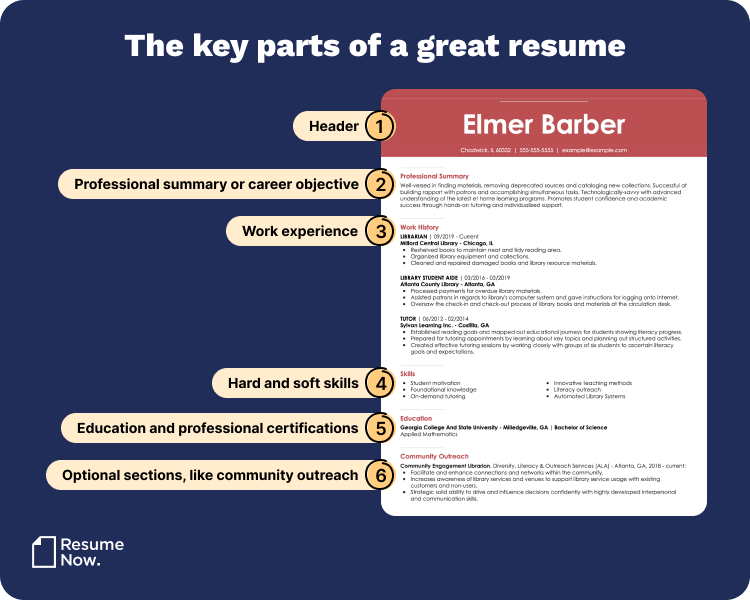
A good resume is clean, well-organized, and easy to scan, with clear sections for contact information, summary, skills, work experience, and education. It uses consistent headings, concise bullet points, and measurable accomplishments that relate directly to the job you're applying for.
Here's an overview of what a great resume looks like when it includes the right sections:
How to Write a Resume for a Job: 9 Easy Steps
To write a resume for a job, choose a clear format, add your contact information, write a strong summary, and highlight relevant skills and accomplishments with measurable results.
Follow these nine steps to create a resume that highlights your qualifications and helps you stand out to employers:
STEP 1
Choose the Right Format
Most resumes include the same essential sections: a summary, work experience, skills, and education. The resume format you choose determines how those sections are organized and which qualifications employers notice first.
There are three standard resume formats:
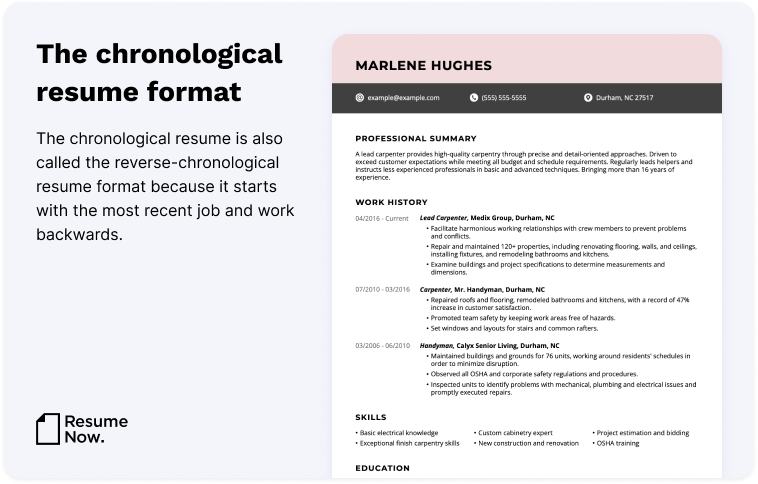
- Chronological resumes list your work experience in reverse-chronological order, beginning with your most recent role.
- Functional resumes emphasize relevant skills rather than a detailed employment history.
- Combination resumes highlight both your skills and your work experience.
The best resume format depends on your experience, career goals, and whether you're changing careers, returning to work, or addressing employment gaps.
For most job seekers, a chronological resume is the strongest choice. Its structure makes it easy for employers to review your career progression, recent experience, and qualifications for the role. Chronological resumes are also generally easy for ATS software to scan when they use a standard format and clear headings.
Here's an example of a chronological resume:
While the chronological resume is the most common, functional and combination resumes may work better in certain situations.
For example, a functional resume can be useful if you have little or no experience, are changing careers, or have gaps in your employment history. This format emphasizes transferable skills and relevant abilities rather than a traditional work timeline, but some employers and ATS may prefer a more traditional format, so use it strategically based on your experience and career goals.
A combination resume works well when you want to emphasize key skills while still presenting a clear employment history. It can be especially useful for career changers or experienced candidates whose skills apply across industries.
STEP 2
Choose an ATS-Friendly Resume Template
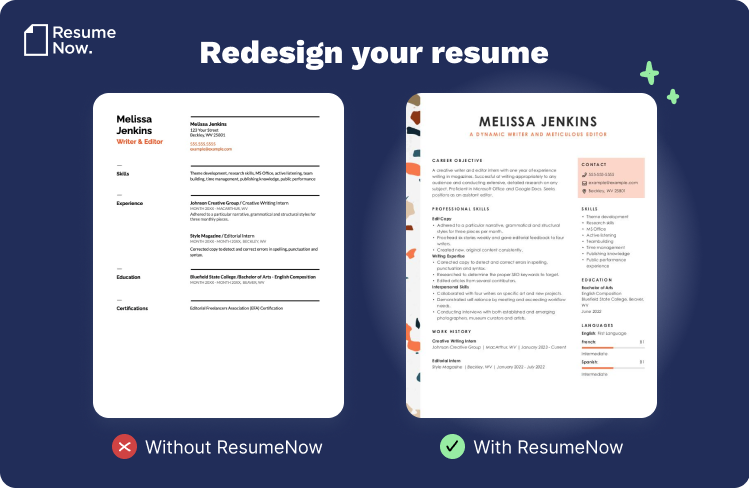
Choose a professional, ATS-friendly resume template with clear headings, readable fonts, and consistent spacing. A clean layout helps employers quickly scan your qualifications while maintaining a polished, organized appearance. Explore our resume templates to find a layout that fits your experience, industry, and career goals.
Here's an example of a clean, professional resume layout:
STEP 3
Add Your Contact Information
Add your full name, phone number, professional email address, and city and state to the top of your resume. You may also include a LinkedIn profile, portfolio, or professional website when relevant.
Keep your resume header clear and accurate so employers can quickly identify you and contact you.
Every resume header should include these essential details:
- Full name
- Phone number
- Professional email address
- City and state
Depending on your profession, you may also include:
- Personal website or portfolio
- LinkedIn profile
- Relevant professional social media profile
Leave the following information off your resume:
- Full street address
- Date of birth
- Personal photo, unless it's standard in your industry
- Sensitive personal information, such as your Social Security number
You may also add a resume headline below your name. A resume headline is a brief statement that identifies your profession and emphasizes one or two of your strongest qualifications.
Here are a couple of resume headline examples:
Data Analyst | Insights, Reporting, and Optimization
Teaching Assistant | Student Support & Classroom Management
STEP 4
Write a Resume Summary or Objective
Write a brief resume summary or objective below your contact information to introduce your strongest qualifications. Keep it to two to four sentences that explain what you offer and why you're a strong fit for the role.
Choose between a resume summary and a resume objective based on your experience and career goals. Here's the difference:
- A resume summary highlights your most relevant experience, skills, and accomplishments. It's generally the best choice when you have experience related to the position.
- A resume objective focuses on your career goals, transferable skills, and the value you hope to bring to the employer. It can work well for students, recent graduates, career changers, and candidates with limited relevant experience.
Here's an example of a well-written resume objective:
Recent computer science graduate with two years of experience developing video game prototypes and resolving technical issues. Seeking a programming role with Avalanche Gaming to contribute coding, testing, and problem-solving skills to the development of innovative gameplay experiences.
Here's a resume summary example for an experienced candidate:
Certified public accountant with 10+ years of experience in financial reporting, tax planning, and regulatory compliance. Improved reporting accuracy by 25% and streamlined processes for clients across multiple industries. Known for analytical rigor, attention to detail, and clear communication with executive stakeholders.
Need help getting started? Our AI Resume Summary Generator creates a customizable first draft based on your experience, skills, and career goals.
STEP 5
Write Your Work Experience Section
To write a strong work experience section, list your jobs in reverse-chronological order and focus on measurable accomplishments.
Work history is one of the most important parts of creating a perfect resume. It's where employers evaluate your experience and the results you've achieved. Tailor each entry to the job description by emphasizing the accomplishments and skills most relevant to the role.
Older positions are often less relevant, especially if they're more than 15 years old. Include earlier roles only when they strengthen your application. If you have extensive relevant experience, it is acceptable to add a second page to your resume.
Tailor Your Experience to the Job
To stand out in a competitive job market, create a targeted resume that emphasizes the experience, skills, and accomplishments most relevant to the position you're applying for.
Use the job description as your guide, but never exaggerate your qualifications. Highlight the experience and skills that genuinely align with the employer's needs.
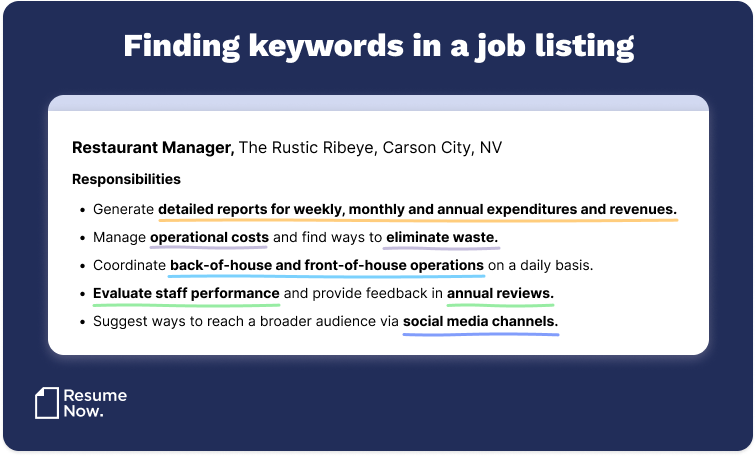
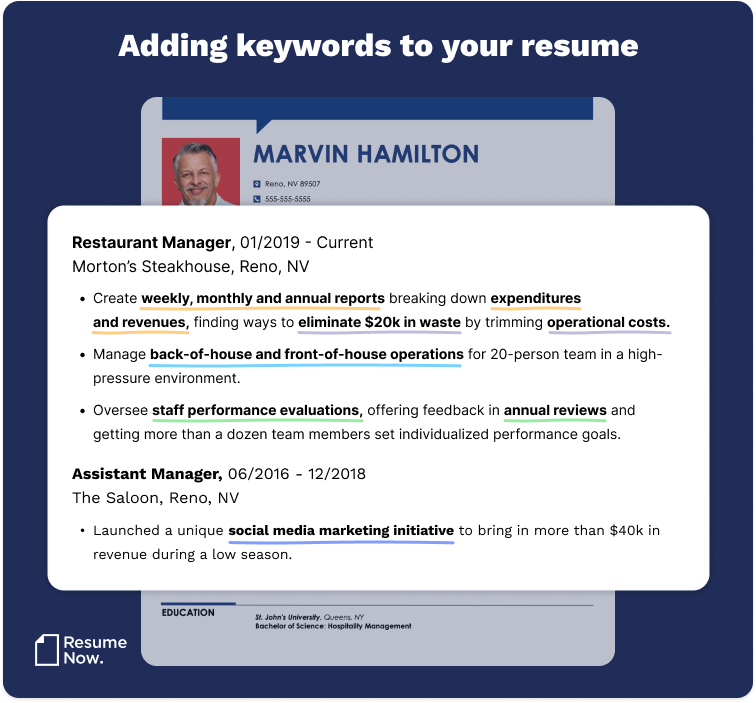
Matching your skills and experience to the job description helps create an ATS-friendly resume that performs better during automated screening.
Here's an example of a job description with important keywords highlighted:
Here's how those keywords can naturally appear in your resume:
Highlight Your Achievements
Employers want to see the impact you've made, not just the tasks you performed. Quantifiable achievements demonstrate the value you brought to previous roles and help hiring managers understand what you can contribute.
Here are four questions to ask yourself to create a results-oriented resume:
- Did I create a new program, process, or initiative that saved time, enhanced productivity, or increased revenue?
- Did I meet or exceed the company's goals? How? By how much?
- Did I lead a team on a special project? How many people were on the team? What was the project, and what did we accomplish?
- Did I receive a promotion in record time?
Use your answers to write accomplishment-focused bullet points. Whenever possible, include measurable results and begin each bullet with a strong action verb.
Here are four examples of well-written, quantifiable successes:
- Organized monthly volunteer projects with more than 30 volunteers per event.
- Provided award-winning in-home medical care for 10 senior citizens over the span of three years.
- Implemented a filing system that organized more than 500 past and current employee files, increasing efficiency by 100%.
- Exceeded sales goals by an average of 30% every quarter in 2025.
Writing your work history as a list of measurable accomplishments helps employers quickly understand the value you bring, helps you stand out from other candidates, and can boost interview chances by up to 40%.
Keep a running list of accomplishments throughout your career so you'll always have measurable examples ready when it's time to update your resume.
Next, let's highlight the skills that make you a strong candidate.
STEP 6
Emphasize Your Most Relevant Skills
To emphasize your most relevant skills, add a dedicated skills section and prioritize abilities that match the job description. Include a combination of hard and soft skills that match the job description to demonstrate both your technical expertise and workplace strengths.
Here's a quick look at the difference between soft skills and hard skills:
- Soft skills are personal qualities and workplace behaviors that influence how you communicate, collaborate, and solve problems.
- Hard skills are technical abilities learned through education, training, or work experience that enable you to perform job-specific tasks.
Here's a side-by-side comparison to help you understand the difference:
Hard Skills
vs
Soft Skills
- Programming
- Foreign language
- Machine learning
- Bookkeeping
- Video editing
- Research
- Data analysis
- Project management
- Financial forecasting
- Technical writing
- Relationship-building
- Leadership
- Active listening
- Problem-solving
- Adaptability
- Perseverance
- Collaboration
- Creativity
- Emotional intelligence
- Flexibility
Include specific software, tools, certifications, or technical skills relevant to your profession, such as Photoshop, Salesforce, SQL, or OSHA safety procedures. For technical skills, you can include a proficiency level to indicate your expertise.
Review the job description for sections such as "Required Skills," "Essential Duties," or "Qualifications." These often contain the keywords employers and ATS look for.
Employers also reference soft skills throughout job descriptions. For example: "If you're analytical, organized, and a strategic thinker with an eye for the big picture and deep customer empathy, then this might be the job for you."
It's perfectly acceptable to mention an important skill in both your skills section and your work history, as long as each reference adds value. For example, you might list "organization" in your skills section and demonstrate it in your work experience by describing how you created a system that reduced waste and improved efficiency.
Likewise, if a job description emphasizes building rapport with customers, you can include interpersonal skills in your skills section and reinforce them in your work history with a measurable achievement, such as increasing customer retention or sales.
Finally, transferable skills deserve special attention because they're valuable across many roles and industries.
How to Feature Transferable Skills
Transferable skills are abilities that remain valuable across different jobs and industries. They're especially important if you're changing careers, returning to work, or applying for a promotion.
Some of the most valuable transferable skills include:
- Communication skills demonstrate your ability to collaborate, build relationships, and share ideas effectively.
- Teamwork skills showcase your ability to collaborate, support colleagues, and contribute to shared goals.
- Problem-solving skills show employers you can analyze challenges and develop practical solutions.
- Time management demonstrates your ability to prioritize tasks, meet deadlines, and stay organized.
- Leadership skills show you can guide projects, support teammates, and make informed decisions.
- Adaptability demonstrates that you can adjust to change, learn quickly, and thrive in new situations.
- Critical thinking helps employers see that you can evaluate information and make thoughtful decisions.
- Organizational skills show you can manage priorities, information, and deadlines effectively.
- Project management demonstrates your ability to coordinate work from planning through completion.
- Creative thinking helps you develop innovative ideas and solve problems.
Pro Tip
Focus on skills that are both relevant to the position and in demand, such as adaptability, communication, critical thinking, and digital literacy.
STEP 7
List Your Education or Training
To list your education or training, include your degree, school name, and graduation date, starting with the most recent. You can also add certifications, coursework, or specialized training relevant to the job.
Keep your education section concise and focus on qualifications that are relevant to the position you're applying for.
Your education section should include:
- The name and location of schools you've attended
- Any degree(s) and academic honors or awards you've earned
- Relevant coursework or special projects (if you don't have much experience)
Your education section should not include:
- Your GPA (unless it's at least 3.5 and you recently graduated)
- The years you attended
- Your graduation dates, which could introduce bias into the hiring process
Pro Tip
If you're a student, recent graduate, or writing your first resume, place your educational section near the top of your resume. Otherwise, position it below your work experience.
Education isn't always a straight path. If you have an unfinished degree, include it only when your field of study or completed coursework strengthens your application for the role.
Here's how to list an unfinished college degree on a resume:
- Mention the name and location of the university.
- List your GPA (if it's above 3.5).
- Note the subject of your coursework.
- Cite the number of credits you completed.
- Showcase any awards accrued.
If your degree is in progress, include your expected graduation date (month and year).
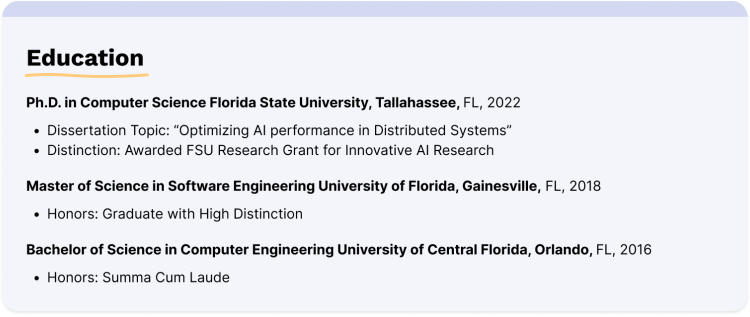
Here's a visual example of a strong education section:
STEP 8
Add Optional Sections
To add optional sections, include relevant extras like certifications, volunteer work, projects, languages, or awards that strengthen your application and relate to the specific job.
You may also have certifications, volunteer experience, professional memberships, publications, or other accomplishments worth highlighting.
Create additional resume sections only when they add relevant information that strengthens your application.
Common optional resume sections include:
- Awards and honors
- Certifications and licenses
- Hobbies and interests
- Languages
- Presentations
- Professional affiliations
- Publications
- Special projects
- Volunteer work
- Workshops
Here are some of the most valuable optional resume sections:
Volunteer Work
Volunteer work can strengthen your resume by demonstrating leadership, initiative, collaboration, and community involvement. It can also reinforce your career values and appeal to employers that prioritize community involvement.
Here's how to list volunteer work on a resume:
- Full-time, consistent volunteer work belongs in your work experience and should be treated as if it were a job.
- Otherwise, create a dedicated section called "Volunteer Experience" or "Community Service."
- Include the organization, location, your title (e.g., "Shelter Volunteer" or "Volunteer Campaign Manager"), the dates you served, and one or two bullet points describing your contributions.
Publications
Relevant publications demonstrate subject-matter expertise, research experience, and professional contributions within your field.
Here's how to list publications on a resume:
- Create a distinct section titled "Publications."
- Place it below your "Education" section.
- Use reverse-chronological order, beginning with your most recent publication.
- Include the year and title of each one.
- Only mention publications relevant to the job.
Quick note: Publications are more commonly included on a CV than a resume. If you're creating a CV, explore our CV examples and CV templates for additional guidance.
Certifications
Certifications validate specialized knowledge and can strengthen your resume, particularly in technical, healthcare, finance, education, and other credential-driven professions. If one is especially relevant, consider featuring it in your resume header.
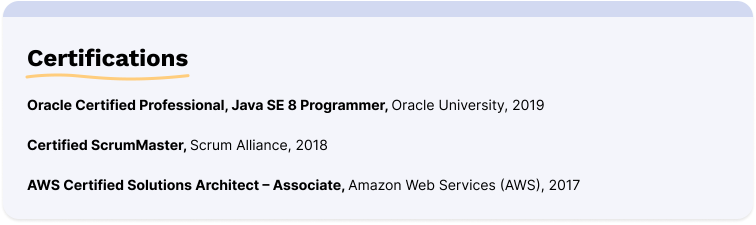
Here's a visual example of what your certifications section might look like:
STEP 9
Proofread & Save Your Resume as a PDF
Proofread your resume carefully for spelling, grammar, formatting, and consistency before submitting it. Reading it aloud, using a proofreading tool, or asking someone else to review it can help you catch mistakes. Taking a short break before your final review can also make it easier to spot errors with fresh eyes.
Once your resume is complete, save it as a PDF to preserve its formatting and ensure it displays consistently across devices and applicant tracking systems. Creating your resume in Microsoft Word or Google Docs is fine, but always save a final PDF version before submitting it.
Pro Tip
Save your resume file with a professional file name, such as "John_Doe_Resume.pdf," so employers can easily identify your document.
How to Create a Resume That Passes ATS
To create a resume that passes ATS, use a simple format with standard headings, incorporate keywords from the job description, and avoid graphics or complex layouts.
Many employers use ATS to screen candidate resumes before a recruiter reviews them. If your resume isn't ATS-friendly, it may never reach a hiring manager.
Before you submit your resume, follow this simple checklist to ensure it reaches a recruiter:
- Use an ATS-friendly template. Avoid overly designed resume templates with complex graphics that might not be parsed by ATS. Resume Now's ATS-friendly resume templates are designed to give you peace of mind about your resume's layout.
- Double-check your formatting. Use an appropriate font style without serifs, standard headings, and consistent spacing so your resume is easy for ATS to read.
- Search for targeted keywords. It's not enough to list relevant experience and skills—your resume needs to be customized for the role with keywords from the job description that show employers that you're a match for their expectations.
- Try our ATS Resume Checker. Our ATS Checker scans your resume and gives you a score based on its ATS-friendliness. Use the personalized tips to maximize your score and apply with peace of mind.
Resume Formatting Tips & Best Practices
To format your resume, use a clean layout with consistent fonts, spacing, and headings. Keep margins balanced, use bullet points for readability, and limit your resume to one or two pages.
Follow these formatting best practices to create a professional, ATS-friendly resume:
- Font choice: Select a professional, easy-to-read font like Arial, Calibri, or Times New Roman in a size between 10 and 12 points for body text and slightly larger for headings.
- Margins and spacing: Use 0.5 to 1-inch margins and ensure consistent spacing between sections to make your resume look clean and organized.
- Section headers: Use bold text and a slightly larger font to make section headings easy to scan.
- Bullet points: Use bullet points to list achievements and responsibilities clearly and concisely.
- Consistency: Maintain consistent formatting throughout your resume, including font sizes, bullet points, and spacing.
Resume Examples for 6 Popular Jobs
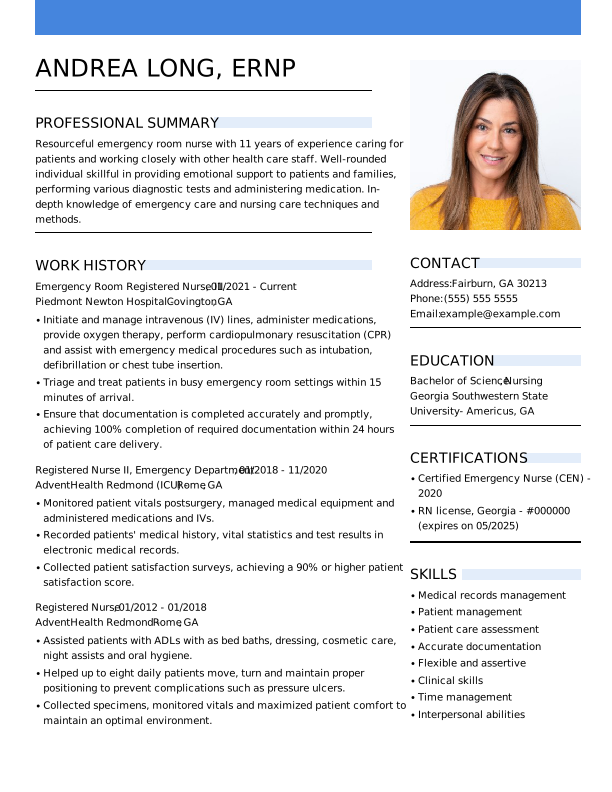
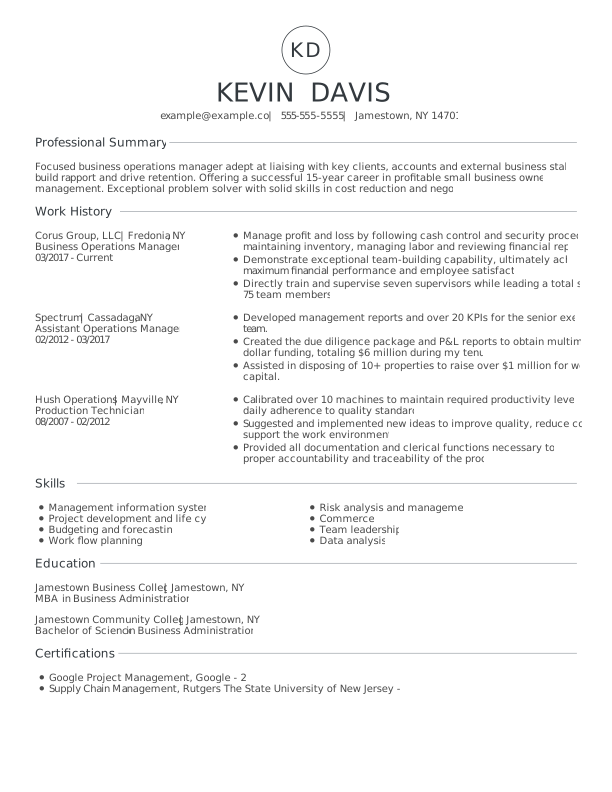
Now that you know how to write a resume, explore these resume examples to see how successful job seekers tailor their experience, skills, and accomplishments for different roles and industries.
1. Emergency Room Nurse
2. Operations Manager
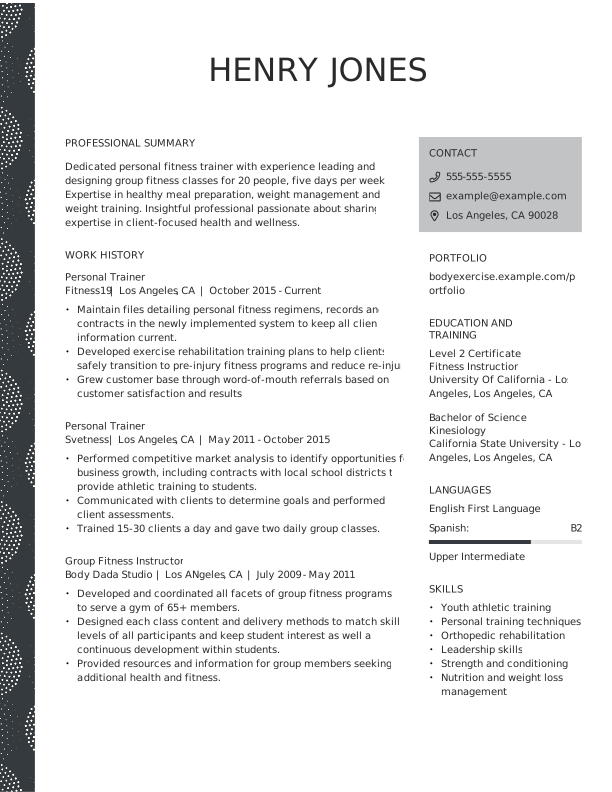
3. Personal Trainer
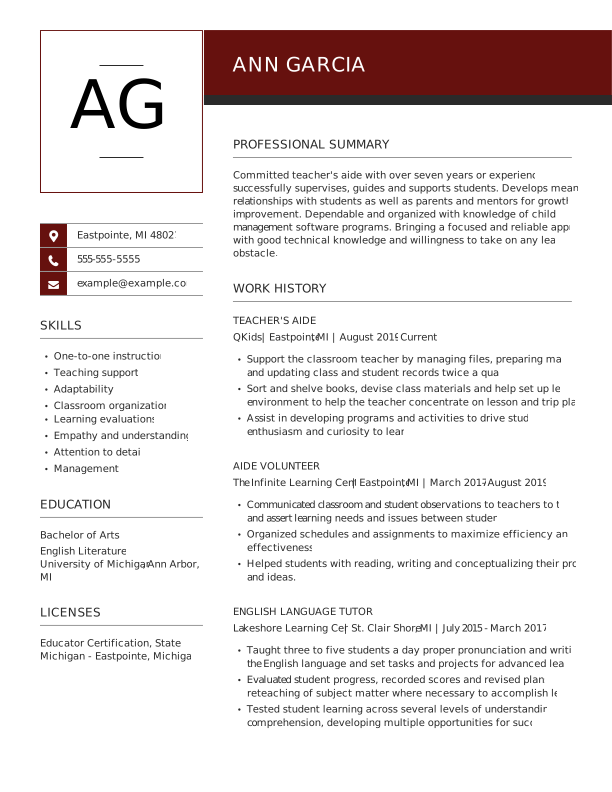
4. Teacher
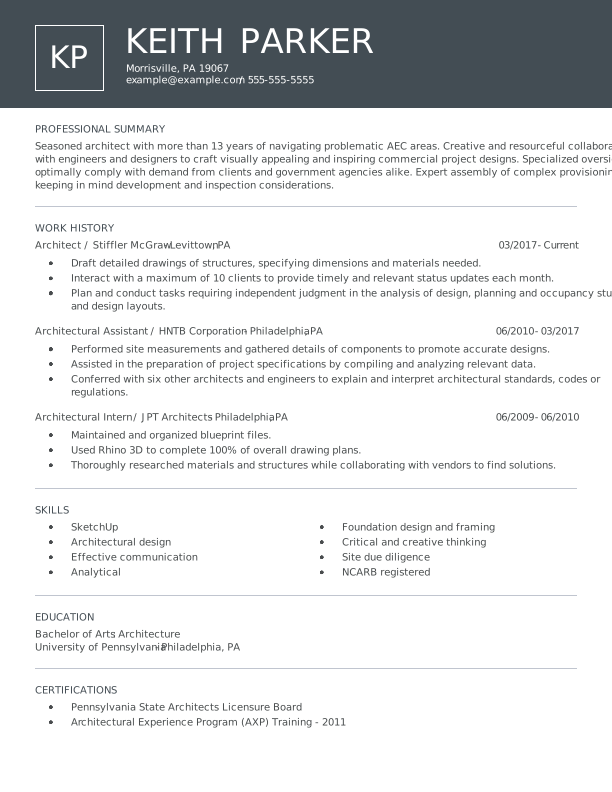
5. Architect
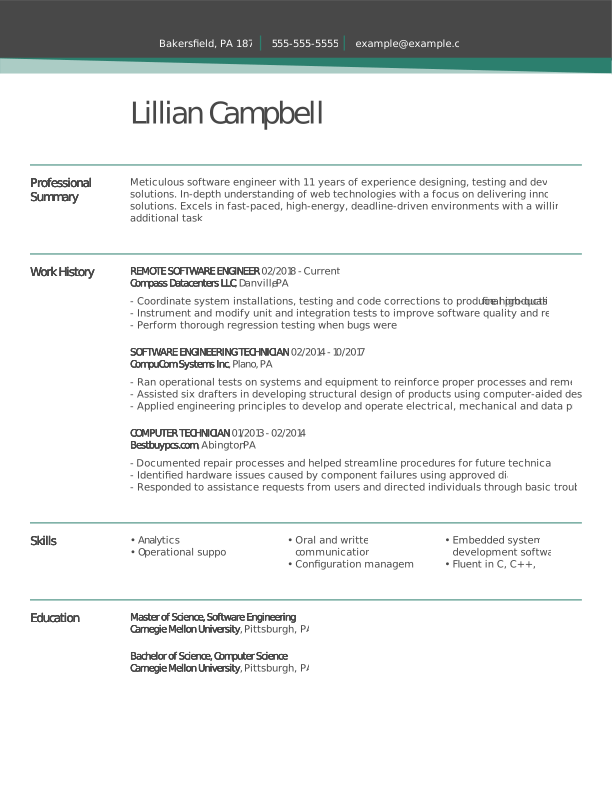
6. Remote Software Engineer
Looking for a different job? We have a library of resume examples to choose from. Here are some of the most popular with job seekers:
Next Steps After Writing Your Resume
After creating your resume, the next step is to write a cover letter that introduces you, explains your interest in the role, and highlights your most relevant qualifications.
A strong cover letter connects your experience to the job, shows enthusiasm, and gives context that your resume alone cannot fully provide.
Stand Out From the Competition With a Cover Letter
A strong cover letter can strengthen your job application and help you stand out from other candidates. While they aren't always required, cover letters remain one of the best ways to set yourself apart.
Here are three ways to make your resume and cover letter a perfect match:
- Apply the same style. Your resume and cover letter templates should have a similar style and use the same colors. A consistent look between the two will make your application cohesive and tell employers you pay attention to details.
- Be mindful of formatting. Your cover letter and resume must be formatted correctly. If you use Arial 11-point font size for your cover letter, use it for your resume, too.
- Use the same header content. Again, consistency matters. If you add a link to your LinkedIn profile on your resume, put it in your cover letter. If you write your phone number as (415) 555-5555 on your resume, don't write it as 415-555-5555 on your cover letter.
Your cover letter is not a repeat of your resume, so don't use it to rehash it or discuss each job line by line. Instead, make your cover letter into a short narrative using skills and experience from your resume strategically.
For example, pick a few skills from your resume and give examples of how you've used them in your cover letter. And, if you display awards on your resume, then use the space on your cover letter to talk about one or two of them in detail.
Not sure what to say? Consider using our AI Cover Letter Generator to speed up the process, or browse cover letter examples for inspiration.
Key Takeaways
Here's a quick recap of the most important resume-writing tips:
- Choose the resume format that best fits your experience.
- Tailor your resume for every job by matching your skills to the job description.
- Include measurable accomplishments whenever possible.
- Use ATS-friendly formatting and keywords naturally.
- Highlight relevant skills that match the role.
- Add optional sections only when they strengthen your application.
- Proofread carefully before submitting.
- Pair your resume with a tailored cover letter.
Frequently Asked Questions
How can I write a simple resume?
To write a simple resume, use a clean one-page layout with clear sections for your contact information, summary, skills, education, and work experience. Focus on concise bullet points, avoid unnecessary design elements, and tailor your content to the job you're applying for.
How do I start to write my resume?
Start by gathering your contact information, work experience, education, and skills. Then choose a professional resume format and write a summary or objective that introduces your qualifications and career goals.
What's the best way to write a resume for the first time?
The best way to write a resume for the first time is to start with a simple format, then include your contact information, education, skills, and any relevant experience, such as internships, volunteer work, or class projects. Focus on clear, easy-to-read bullet points and tailor your content to the job you want, even with limited experience.
What is the seven-second rule for resumes?
The seven-second rule for resumes means hiring managers typically spend about seven seconds scanning a resume before deciding whether to continue reading or move on. In that time, your resume must quickly highlight key skills, relevant experience, and strong formatting so that important information is immediately visible and easy to understand at a glance.
What does a good resume look like?
A good resume is clean, easy to scan, and tailored to the job you're applying for. It includes clear sections for your contact information, summary, work experience, skills, and education while highlighting measurable accomplishments instead of simply listing responsibilities.
What are the three C's of a resume?
The three C's of a strong resume are clarity, conciseness, and customization. A resume should be easy to scan, focused on relevant accomplishments, and tailored to each job application.
Can I use AI to write my resume?
Yes, you can use AI to help write your resume, but it should be used as a supporting tool rather than a complete replacement for your own input.
AI can help you brainstorm ideas, write first drafts, improve wording, and tailor your resume to a job description. Always review the final document carefully to ensure it's accurate, personalized, and reflects your real experience.
How should I create a resume for a career change?
To write a resume for a career change, use a functional or hybrid format that emphasizes your transferable skills. These resume formats will emphasize your most relevant skills, accomplishments, and work experience. Our Resume Builder can help you decide which format to use based on your information, prior work history, and the job you want.
How has AI affected the resume screening process?
Modern applicant tracking systems (ATS) often use automated screening features, including AI-powered tools, to identify resumes that match job requirements. Optimizing your resume for ATS improves your chances of reaching a recruiter.
Additionally, AI can analyze resumes for formatting, consistency, and overall presentation, streamlining the hiring process and reducing the time spent on manual resume reviews.
How long should a resume be?
Most resumes should be one page long if you have fewer than 10 years of experience. Two-page resumes are appropriate for experienced professionals with extensive relevant work history. Focus on relevance rather than page count.


Don is a Certified Professional Resume Writer (CPRW) with more than 10 years' experience creating digital content, including four years helping job seekers develop their careers.
More resources

How to Make a Canadian Resume: Format, Examples, & Expert Tips
Learn how to create a Canadian resume with the right format s...

12+ Blank Resume Templates to Download & Fill In
Find a blank resume template that fits your experience and car...
What Should a Resume Look Like in 2026? (Examples)
A professional resume should use a clean easy-to-scan layout ...

What Is an ATS Resume? Definition & How to Write Yours
An ATS resume is a resume formatted to help applicant tracking...
 Get the job 2x faster*
  Customize your cover letter